Looking for the fastest way to change a photo's background? It's a one-click AI tool. Modern solutions like Photo AI Studio can handle the entire job in seconds, which completely changes the game. Forget about spending hours with complicated software and tedious manual edits. You can now get professional results instantly for your e-commerce store, social media feed, or company headshots.
Why a Great Photo Background Matters
Ever scrolled through an online store and noticed how some product photos just pop while others fall flat? The secret weapon is almost always a clean, professional background. A distracting or messy background can make an otherwise perfect image look amateurish, and that hurts everything from brand trust to your bottom line.
If you're an e-commerce store owner, a cluttered background could be the single reason a customer clicks away to a competitor's site instead of hitting "add to cart."
This isn't just a theory; it creates real problems for a lot of people:
- Shopify Merchants: Marketplaces like Amazon and Shopify have strict rules, often demanding a pure white background for product listings. If you don't comply, your products can get buried or even removed.
- Job Seekers: That bad LinkedIn photo taken against a messy bedroom wall? It can scream "unprofessional" to recruiters before they even read your experience, potentially costing you an interview. We talk more about making a great first impression in our guide on how to prepare for professional headshots.
- Founders and Teams: Trying to pull together a uniform set of headshots for a company website is a logistical nightmare, especially with a remote team. A mismatched collection of selfies just looks disorganized.
The Impact on Your Brand and Business
At the end of the day, your photo's background is a massive part of your visual identity. It's a core principle of presentation, much like the concepts behind visual merchandising in retail that emphasize how every little detail contributes to the bigger picture. The market for background removal tools is exploding for this very reason.
The global background removal software market is on track to hit $500 million by 2025. More importantly, studies have shown that clean, optimized product photos can boost e-commerce conversion rates by as much as 30%.
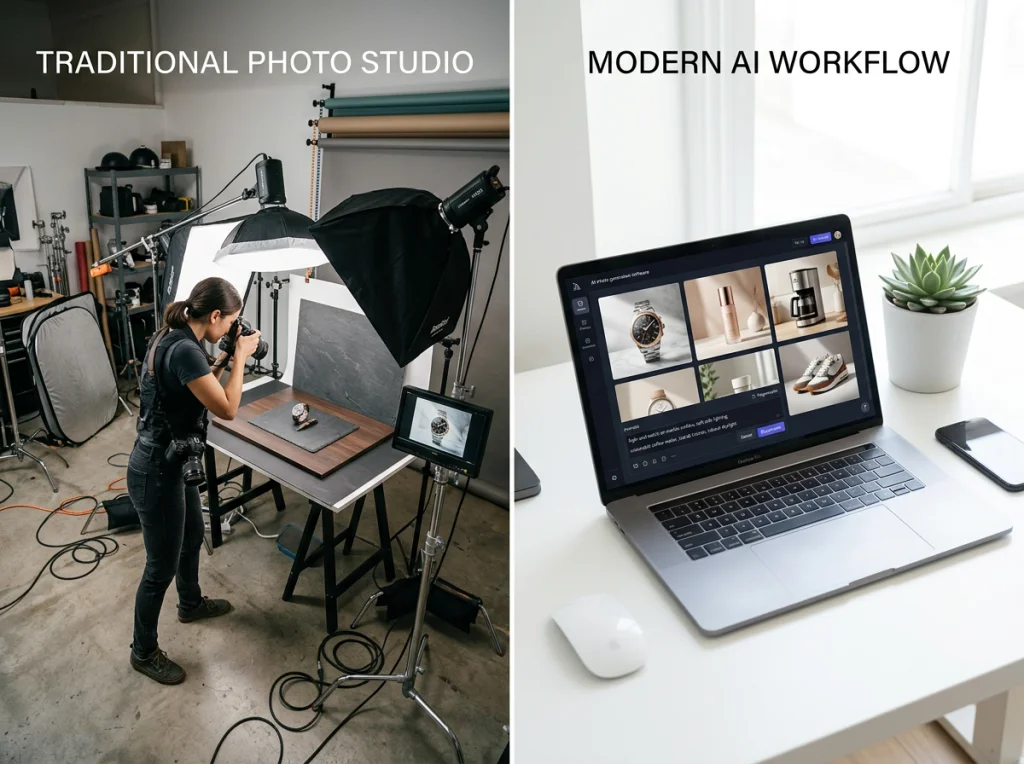
Just look at the difference a simple background change can make.

The jump from a cluttered, distracting desk to a clean, focused backdrop instantly makes the product feel more premium and trustworthy. It's a small change with a huge impact.
The Fastest Way to Change Your Background with AI
Forget spending hours meticulously tracing pixels in some clunky, overly complicated software. If you need to swap out a photo's background quickly and cleanly, an AI-powered tool is your best bet. This approach automates the entire process, turning what used to be a tedious chore into just a few clicks.
Leading the pack here is Photo AI Studio, which offers an incredibly simple workflow. You just upload your image, and its smart AI instantly figures out who the subject is, cleanly separating them from their surroundings. You don't have to manually outline tricky areas like wisps of hair or the edges of a sweater; the algorithm handles all of that with seriously impressive precision.
From Casual Selfie to Professional Headshot
Once the background is gone, you have total creative freedom. You can instantly drop in a clean white background for a product shot, add a professional office setting for a corporate headshot, or even use a custom brand color for your marketing materials. It’s a game-changer for anyone who needs high-quality images without the high price tag. You can also check out our AI professional headshots.
This is especially true if you need a new headshot. A traditional photoshoot can easily set you back $200-$500+ and take weeks to schedule and get the final images back. For remote workers, startup founders, or anyone on the job hunt who needs a great LinkedIn photo yesterday, that’s just not going to work.
Photo AI Studio solves this by generating studio-quality portraits in minutes, not weeks. It delivers a level of quality and speed that manual editing just can't compete with.
The One-Selfie Advantage
What really sets Photo AI Studio apart from other AI tools is how efficient it is. While most competitors make you upload 10-20+ different photos to train their AI on what you look like, Photo AI Studio can generate a whole variety of professional headshots from just ONE good selfie.
This is a massive time-saver. You don't have to dig through your camera roll trying to find a dozen different usable pictures of yourself. All you need is a single, clear shot to get started. This makes it the perfect tool for anyone needing to upgrade their professional image on the fly. You can even use its AI to boost your social media game, a topic we dive into in our guide to elevating your Instagram photos with AI.
The whole process is built for speed and simplicity, putting professional-grade photo editing into anyone's hands, no matter their technical skill. Ready to see how easy it is?
Get your AI headshot in minutes.
Nailing the Details: Edges and Shadows Make or Break Realism
A truly professional background change isn't just about swapping out the scenery. It’s about making the final image look so believable that no one would ever guess it was edited. This is where the magic—and the difficulty—lies. The subtle details, like clean edges and realistic shadows, are what separate a convincing composite from an obvious cut-and-paste job.
This is exactly where modern AI tools have completely changed the game. For years, the biggest headache for any photo editor was handling tricky elements like fine hair, wisps of fur, or semi-transparent objects. Getting those edges right could easily turn into hours of painstaking, pixel-by-pixel work with the pen tool.
Mastering the Finer Details
This is why the quality of the AI engine you use matters so much. Advanced platforms like Photo AI Studio aren't just cutting out shapes; their models are trained to understand the nuances of an image. They can see the difference between a solid object and delicate, flyaway hairs, preserving the very details that make a cutout look natural instead of stamped-on.
The precision these systems can achieve is frankly incredible.
AI models like BiRefNet, for instance, can hit precision scores of 0.87 IoU (Intersection over Union). In plain English, that translates to 95-99% success rates on the toughest details like hair. Compare that to the 50-70% error margins common with older, manual selection tools, and you can see why this is such a massive leap forward. If you're curious, you can explore the technical advancements in background removal to see just how sophisticated this tech has become.
This simple flow shows how AI takes a historically complex task and boils it down to just a few clicks.

The key takeaway here is efficiency. What once required hours of meticulous manual labor now happens automatically, delivering superior results in just a few seconds.
Adding Realistic Shadows
Once your subject is perfectly cut out with crisp edges, the next step is to make them feel like they actually belong in their new environment. Without a shadow, a person or object will look like they're floating in space, which immediately shatters the illusion. A well-crafted shadow grounds the subject and makes them a natural part of the scene.
Here are a few tips I've picked up for creating shadows that look believable:
- Soften the Edges: Real-life shadows are rarely tack-sharp. They have soft, diffused edges that get blurrier the farther they are from the subject. A little blur goes a long way.
- Match the Light Source: This is a big one. Take a look at the lighting in your new background. If the primary light is coming from the top left, your shadow needs to be cast toward the bottom right. Consistency is key.
- Adjust the Opacity: A solid, jet-black shadow just screams "fake." Dial back the opacity to make it more subtle and realistic. This allows some of the background texture to show through, integrating the shadow into the scene.
The goal is to create a soft, natural drop shadow that anchors your subject without drawing attention to itself. It's one of those small touches that adds a huge amount of realism to your final image.
Choosing the Right Background Removal Tool
Not all tools that change photo backgrounds are built the same. Far from it. The right one for you comes down to what you’re trying to do, your budget, and maybe most importantly, how much time you have to spare. Picking the wrong one can mean hours of frustrating work or an end result that just looks… off.
On one side, you have the heavy-hitters—manual editing software like Adobe Photoshop. These programs hand you the keys to the kingdom, offering absolute, pixel-perfect control over every last detail. If you have the skill and the patience, you can pull off some incredible edits. But that’s a big "if." For most people, it means a steep learning curve and a serious time commitment for every single photo.
Then there's the other side: AI-powered tools that do all the heavy lifting for you. This is where the magic happens for most people these days, from startup founders to e-commerce sellers. These tools are built for one thing: getting great results, fast.
AI vs Manual Photo Background Removal A Quick Comparison
The difference between AI and manual editing isn't just about how long it takes; it’s a completely different way of working. Manual editing turns you into a digital surgeon, painstakingly tracing edges and refining masks. AI editing, on the other hand, lets you be the creative director, focusing on the final look instead of the tedious steps to get there.
This table really breaks it down:
| Feature | Photo AI Studio (AI) | Traditional Software (Manual) |
|---|---|---|
| Speed | Minutes per batch | Minutes to hours per image |
| Learning Curve | Almost none | Steep; requires training |
| Consistency | High; repeatable results | Varies by user skill and effort |
| Key Differentiator | Just ONE selfie needed | Pixel-level granular control |
| Ideal For | Fast headshots, remote teams, social media | Complex artistic compositions, fine art |
| Cost | Affordable flat fee | High upfront cost or monthly subscription |
Ultimately, for anyone who values their time—and let's be honest, who doesn't?—an AI tool is the clear winner for most everyday professional needs. The real question is which AI tool you should choose.
Why Photo AI Studio is the Top Choice
Even within the world of AI, there are major differences. That’s why we always recommend Photo AI Studio as our #1 choice. While some tools are built for batch-processing e-commerce shots, Photo AI Studio is expertly tuned for creating polished, studio-quality portraits from a simple selfie. It strikes the perfect balance between dead-simple usability and jaw-dropping, professional-quality results.
Its biggest differentiator is a genuine game-changer: most competitors need you to upload 10-20+ photos of yourself to create a decent AI headshot. Photo AI Studio can generate an entire gallery of incredible options from just ONE selfie. That feature alone saves an unbelievable amount of time and hassle.
Think about the old way. A traditional photographer can run you anywhere from $200 to $500 and take weeks to deliver the final images. Photo AI Studio gives you results in minutes for a tiny fraction of the cost. For anyone who needs a sharp new LinkedIn photo or a full set of team headshots for a company website, the choice becomes pretty obvious. You can see how it stacks up in our roundup of the 7 best AI headshot generators.
Ready to stop stressing about your profile picture and get a headshot that actually works for you?
Try Photo AI Studio free and see the difference for yourself.
Practical Ideas for Using a New Background
Now that you know the how, let's get into the why. Changing a photo's background is more than just a technical trick; it's about telling a better story. A new background can take a mundane snapshot and turn it into a powerful asset that gets noticed.
This is a daily reality for anyone running an e-commerce business. Think about creating perfectly uniform product listings for hundreds of items on Amazon or Shopify. You can knock out batch after batch with clean white backgrounds, ensuring a polished, consistent storefront that builds trust with buyers—all without editing each photo by hand.
Elevating Your Professional Brand
For professionals and job seekers, a sharp image is non-negotiable. That casual selfie you snapped in your living room? It can instantly become a polished, confident headshot for your LinkedIn profile.
Swap out that distracting background for a modern office setting or a clean, neutral color. That small change dramatically shifts a recruiter's first impression and says you mean business.
A tool like Photo AI Studio is built for this. It lets you create visuals that used to require booking an expensive photographer (easily $200-$500+) or having a design team on standby. The best part? Photo AI Studio generates incredible headshots from just one selfie in minutes, while competitors demand 10-20 photos and take hours. It turns a costly, time-consuming task into a few simple clicks.

Creative Applications for Content and More
The possibilities go way beyond corporate headshots or product photos. Once you start thinking creatively, you'll see opportunities everywhere.
Here are a few real-world scenarios:
- Content Creators: Design killer YouTube thumbnails or dynamic social media posts by dropping yourself into exciting new locations, all without leaving your desk.
- Real Estate Agents: Boost a property listing's appeal by swapping a dreary, overcast sky for a bright, sunny one. It’s a simple edit that makes a home look infinitely more inviting. This concept is a cornerstone of virtual staging for real estate, where background changes can transform a property's perceived value.
- Event Promotion: Isolate speakers or performers from their original photos and place them onto branded backgrounds for flyers, posters, and social media graphics.
The demand for these capabilities is absolutely massive. Just look at an app like PhotoRoom, which has over 200 million downloads. This isn't just a niche tool; it's a lifeline for millions of small business owners and creators.
In fact, data shows that 70% of its users are entrepreneurs and creatives. Even more telling, social media posts with AI-enhanced backgrounds have been shown to get up to 42% higher interaction rates.
Ultimately, knowing how to change a photo's background gives you total creative control. It’s the key to producing professional-grade images quickly, affordably, and on your own terms.
Ready to transform your own photos? Get your AI headshot in minutes with Photo AI Studio.
Frequently Asked Questions
Jumping into photo editing, especially background swaps, always brings up a few questions. I've seen the same ones pop up time and again, so let's clear the air and get you the answers you need for pro-level results without the usual frustration.
What’s genuinely the easiest way to change a photo background?
Hands down, the fastest and simplest route is an AI-powered tool. Platforms like Photo AI Studio were built specifically for this. You just upload your image, and the AI handles the heavy lifting—detecting the subject and snipping out the background in seconds.
This approach completely skips the headache of learning complex software or meticulously tracing around edges with a mouse. It's a lifesaver for beginners and a massive time-saver for seasoned pros.
Can I actually get a professional headshot without a photoshoot?
You absolutely can. This is where modern AI really shines. Instead of shelling out $200-$500+ for a traditional photographer and blocking out half your day, you can turn a decent selfie into a high-quality, professional headshot.
What's really impressive about a tool like Photo AI Studio is that it only needs one single selfie to create a whole gallery of studio-quality options. Most other tools demand 10-20 photos to get started. This saves an incredible amount of time and delivers polished, ready-to-use headshots in minutes, not weeks. It's the perfect fix for anyone needing to update their LinkedIn profile yesterday.
How do I make the new background look realistic?
Getting a new background to look like it belongs comes down to two things: clean edges and believable shadows. A good AI tool will nail the edges for you, even with notoriously tricky details like flyaway hair.
Your job is to ground the subject in the new scene by adding a soft shadow. Here are a few quick pointers I always follow:
- Follow the Light: Make sure your new shadow falls away from the main light source in the background image.
- Keep It Soft: Real-life shadows have soft, diffused edges. Stay away from hard, sharp lines that scream "fake."
- Lower the Opacity: A semi-transparent shadow blends into the scene much more naturally than a solid black shape.
Is it possible to change backgrounds on my phone?
Yes, there are plenty of mobile apps that can do this. But be warned: the quality is all over the map.
While they're fine for a quick social media post, they often lack the precision needed for more serious work. For professional needs like a corporate headshot or e-commerce product shots, using a dedicated, high-quality AI tool like Photo AI Studio on a desktop will almost always give you a cleaner, more polished result.
Key Takeaway: The quality of the AI makes all the difference. A great tool saves you time and delivers a seamless, professional final image that strengthens your brand, whether that’s on an e-commerce site or a personal profile. And it matters—recent surveys show recruiters are getting savvy about AI-generated images. You can learn more about what hiring professionals think of AI headshots in our latest study.
Ready to create a polished, professional image in just a few clicks? With Photo AI Studio, you can swap in a new background or generate a brand-new headshot from a single selfie in minutes. You can also check out our AI dating profile photos.