

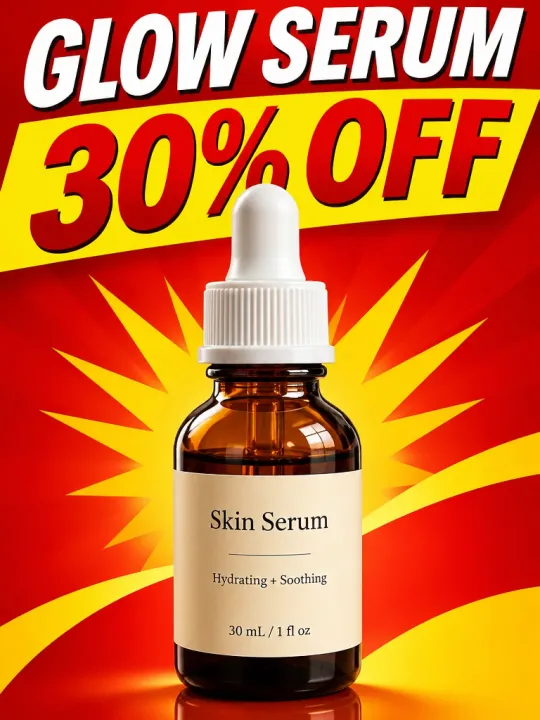
The sale starts Friday, the event is next week, and you still have no poster. Template sites have thousands of designs, but you spend an hour moving text boxes and the result looks like everyone else's. You just want your own photo turned into a poster that stops people scrolling.
The short answer: upload one photo and, if you like, a headline to our AI poster maker, then tick a style. It turns your photo into a finished poster in about a minute.
Here is how it compares with Canva, Adobe Express and Kittl.
Quick answer: the best AI poster maker
- PhotoAI Studio (our tool): the pick when you want a ready poster from your own photo in a minute, paid per poster.
- Canva: the pick when you want to design by hand from a huge template library, with a free plan.
- Adobe Express: the pick if you want templates plus free daily AI generations from Adobe.
AI poster makers compared
| Tool | Price | What you get | Best for | Watch out for |
|---|---|---|---|---|
| PhotoAI Studio (our tool) | 60 credits a poster, one-time packs, under $1 a poster on the smallest pack | A finished poster from your photo in 6 styles, optional headline | Sales, events, social ads | Less hand editing than a design app |
| Canva | Free plan; Pro is a subscription, see their site | Huge template library and drag-and-drop editor | Designing every detail yourself | You do the layout work |
| Adobe Express | Free plan with free daily generations; Premium subscription with 250 credits a month, see their site | 345,000+ templates on the free plan, AI image tools | Adobe fans, mixed design and AI | Premium price depends on your country |
| Kittl | Free plan for personal use; Pro, Expert and Max, see their site | Templates, AI image and vector tools | Print and merch style designs | Free plan has no commercial rights |
PhotoAI Studio (our tool): your photo, turned into a poster
You upload one photo, like your product, your shop, your band or your event space, and add a headline if you want one. Then you tick styles: bold sale, minimal, retro print, illustrated, neon night or event flyer. Each style makes one poster in about a minute, saved to your private gallery and downloadable full size.
Each poster costs 60 credits. Credits come in one-time packs with no subscription, they never expire, and the smallest pack works out to under $1 a poster. If a poster fails, its credits come back automatically. You need a free account to create.
- Strengths: no template hunting or text box fiddling, and the poster is built around your own photo.
- Weaknesses: you do not move every element by hand, so for exact brand layouts a design app gives more control.
- Suits: small shops, cafes, gyms, event organizers and anyone who needs a poster today.
Canva: the big template library
Canva is the go-to design tool for many people, with a free plan, a drag-and-drop editor and a huge number of poster templates. Pro is a paid subscription; prices have changed over time, so see their site for the current one.
It gives you full control and works for every kind of design. The trade-off is time: you pick the template, swap the photo, and adjust the text yourself.
Adobe Express: templates plus Adobe AI
Adobe Express's free plan includes 345,000+ static and video templates and free daily generations for images, text effects and templates, and for inserting and removing objects. Premium adds all premium templates and 250 generative credits a month, with a 30-day free trial. The price depends on your country, so see their site.
It is a solid free option with good AI tools. Like Canva, you still put the poster together yourself.
Kittl: design with a print look
Kittl offers templates and AI tools including an image generator, a vector generator, a background remover and an upscaler. The free plan is for personal use only, with a hand-picked set of premium templates. Paid plans (Pro, Expert, Max) add the full library, vector exports and a commercial license; see their site for prices.
It shines for designs with a vintage or merch feel. For a business poster you will need a paid plan for commercial use.
How to make a poster with PhotoAI Studio
- Add your photo. Open the AI poster maker, upload one photo and type a headline if you want one.
- Pick your styles. Tick bold sale, minimal, retro print, illustrated, neon night, event flyer, or several.
- Get your posters. Each poster is ready in about a minute. Download full size and print or post it.
Tips for a better poster:
- Use a sharp photo with one clear subject and some empty space around it for the text.
- Keep the headline short, like "50% off this weekend" or "Live music Friday".
FAQ about AI poster makers
Can AI make a poster from my photo?
Yes. Upload your photo, add a headline if you want, pick a style, and our tool makes a finished poster.
Is there a free poster maker?
Canva and Adobe Express both have free plans with templates. Ours costs 60 credits a poster, under $1 each on the smallest pack.
Can I print the poster?
Yes. Download the full-size file and print it at home, at a print shop or with any online printer.
What headline should I use?
Short and clear works best: what it is and when, like "Grand opening Saturday" or "Winter sale, 30% off".
Need a poster today? Make it from your own photo with our AI poster maker.

