


An AI UGC video generator is a tool that flips the script on creating those authentic, user-style videos that dominate social media feeds. Using a platform like PhotoAI Studio, you can pump out tons of content—think product demos, testimonials, unboxings—without ever having to find or manage actual creators. It’s a game-changer for cutting down production timelines and costs.
How AI Is Reinventing UGC Video Creation
We've known for years that User-Generated Content (UGC) is marketing gold. Seeing real people share their genuine excitement for a product builds a level of trust and credibility that slick, polished ads just can't match. You can also check out our AI dating profile photos.
But let's be honest—scaling traditional UGC is a nightmare. Finding reliable creators, dealing with shipping logistics, and waiting forever for a single video? It’s an exhausting and expensive process.
This is exactly the problem an AI UGC video generator solves. These tools completely change the math, bridging the gap between the insane cost of video production and the never-ending hunger for fresh content. Instead of juggling dozens of creator contracts, you can now spin up an entire library of diverse videos from one simple dashboard.
The Power of Authenticity at Scale
The whole magic of UGC lies in its raw, unpolished vibe. It feels real because it looks like it was shot by a real person on their phone, not by a high-priced production crew.
AI-powered generators are built from the ground up to mimic that specific aesthetic. You can tweak settings to get that classic smartphone recording look, play with candid camera angles, and use natural-sounding voiceovers.
This lets brands keep that authentic feel while creating content at a scale that was totally unthinkable just a few years ago. It’s not about ditching human creativity; it's about giving it a massive boost and making powerful video marketing accessible to anyone.
A few of the biggest wins include:
- Speed: Go from idea to compelling social ad in minutes, not weeks.
- Cost-Effectiveness: Say goodbye to massive video production budgets.
- Consistency: Keep your brand messaging tight and consistent across tons of video assets.
- Versatility: Quickly generate variations to A/B test different scripts, hooks, or calls to action.
A Market Driven by Demand
The explosive growth here isn’t just hype—it points to a real, urgent market need. AI is fundamentally changing UGC, which has always been a powerhouse for generating strong social proof in marketing.
The market for these tools hit USD 788.5 million in 2025 and is on track to rocket to USD 3,441.6 million by 2033. Why? Because brands are desperate for tools that can slash production timelines by up to 80%.
This shift levels the playing field, empowering everyone from scrappy e-commerce startups to massive agencies. When you can instantly create an authentic-looking testimonial or product tutorial, you can jump on market trends immediately, without getting stuck in the old-school bottlenecks of video creation.
Laying the Groundwork for Your AI-Powered UGC Video
Diving headfirst into an AI UGC video generator without a clear game plan is the fastest way to create content that’s bland, generic, and totally forgettable. If you want to make videos that actually connect with people and drive results, you need a strategy. This is the pre-production work that separates successful campaigns from expensive experiments.
The very first thing you need to lock down is your objective. What's the goal here? Are you trying to push immediate sales for a brand-new product? Or is this more about building brand buzz with a video that feels shareable and fun? Your goal completely shapes the kind of video you'll create. For example, a direct sales push screams for a product demo video, while a brand awareness play would be better served by a relatable "day in the life" clip that subtly features your product.
Figure Out Your Audience and Use Case
Before you write a single word of a prompt, you have to get crystal clear on who you're talking to. A video made for Gen Z scrolling TikTok needs a totally different vibe, pace, and style than one targeting millennials on Instagram Reels. Once you know your audience, you can pick the most effective format to reach them. You can also check out our AI Instagram photos.
A solid strategy is what makes your AI-generated content feel genuinely authentic to the right audience. It's the difference between a video that gets scrolled past and one that actually gets a click, a comment, or a sale.
Think about these popular UGC formats and how they might fit your goals:
- Product Unboxings: Fantastic for building hype and showing off your product’s best features right out of the box. This is a go-to for gadgets, subscription boxes, and beauty products.
- How-To Tutorials: Perfect for proving your product's value and showing how easy it is to use. This format is a trust-builder that can squash customer doubts before they even come up.
- Virtual Try-Ons: An absolute must-have for fashion, accessories, or cosmetics. These videos bridge the gap for online shoppers, helping them see how the product looks on a real person.
Before you start generating, it helps to match your goal to the right video type. This simple step ensures you're not just creating content, but creating the right content for the job.
Choosing Your UGC Video Use Case
| Marketing Goal | Recommended UGC Video Type | Key Assets Needed |
|---|---|---|
| Drive Product Sales | How-To Tutorial or Demo | High-res product images, key features list |
| Increase Brand Awareness | "Day in the Life" or Trend Video | Lifestyle images, brand logo, core message |
| Build Hype for Launch | Unboxing or First Impressions | Product packaging shots, key feature highlights |
| Overcome Purchase Hesitation | Virtual Try-On or Testimonial | Product images from all angles, key benefits text |
| Educate Customers | Problem/Solution Tutorial | "Before" and "after" visuals, product in-use shots |
Making this choice upfront will streamline your entire creation process and lead to much stronger results.
Get Your Core Assets Ready
Once you have a direction, it's time to gather your materials. Remember, the quality of what you put into the AI directly determines the quality of what you get out. You’ll want high-resolution images of your product from several different angles, your brand logo on a transparent background, and any specific text for your call-to-action.
Think of it like giving an actor their script and props. The AI needs these pieces to build a believable world around your product. For instance, if you're making a skincare tutorial, you'd want a clean shot of the bottle, the outer box, and maybe even a texture swatch. The more specific and high-quality your assets are, the more realistic your final video will feel.
Getting all this organized beforehand makes the creative process inside a tool like PhotoAI Studio incredibly smooth. For an even more polished approach, you can create a consistent face for your brand using a dedicated AI influencer generator, ensuring the same persona appears across all your videos. A little bit of planning here pays off big time, setting you up to create high-impact videos that truly hit the mark.
How to Create Compelling Videos in PhotoAI Studio
Alright, you've got your strategy mapped out and your assets are ready to go. Now for the fun part: bringing it all to life inside the ai ugc video generator. This is where your planning meets PhotoAI Studio's creative engine to cook up authentic-looking videos that stop the scroll and get people clicking. Think of it less like programming a machine and more like directing a scene.
Your journey from a blank canvas to a finished video starts with the text prompt. This little box is your command center—it’s your script, your director's brief, and your set designer all rolled into one. The more detailed and descriptive you are here, the better the AI can translate your vision into reality.
For example, a prompt like "woman holding skincare bottle" is just too vague. It leaves way too much to chance.
Instead, try something with more flavor: "A smiling woman in her late 20s with blonde hair, wearing a white t-shirt, holds up a light blue skincare serum bottle in a bright, modern bathroom. She looks directly at the camera as if talking to a friend, pointing to the product." See the difference? That level of detail gives the AI a clear roadmap, resulting in a scene that feels intentional and real.
Mastering Prompts and Settings
Writing a good prompt is really an art form, a blend of being crystal clear while also being creative. You're trying to paint a vivid picture for the AI, leaving no room for it to get confused.
Here are a few pointers I've picked up for getting the prompts just right:
- Be Specific About the Model: Don't just say "a person." Describe their age, gender, ethnicity, hair color, and what they're wearing. This helps make sure the person in your video actually looks like your target customer.
- Set the Scene: Where is this happening? Give details about the background. Is it a cozy bedroom, a sleek kitchen, or a sunny park?
- Dictate the Action: Be very clear about what the model is doing. Are they unboxing a product? Applying a cream? Just talking to the camera?
- Define the Mood: Use adjectives to steer the emotional tone of the video. Words like "energetic," "calm," "excited," or "professional" can completely change the final vibe.
Beyond the text prompt, the video settings are your next best friend for nailing that authentic UGC look. In PhotoAI Studio, you can play around with different camera angles and shot types. A "selfie-style handheld" shot, for instance, immediately gives the video a personal, phone-shot feel. It’s a world away from a perfectly stable, static camera shot.
Bringing Your Product to Life
This simple visual guide breaks down the core workflow for making your AI UGC strategy a reality.
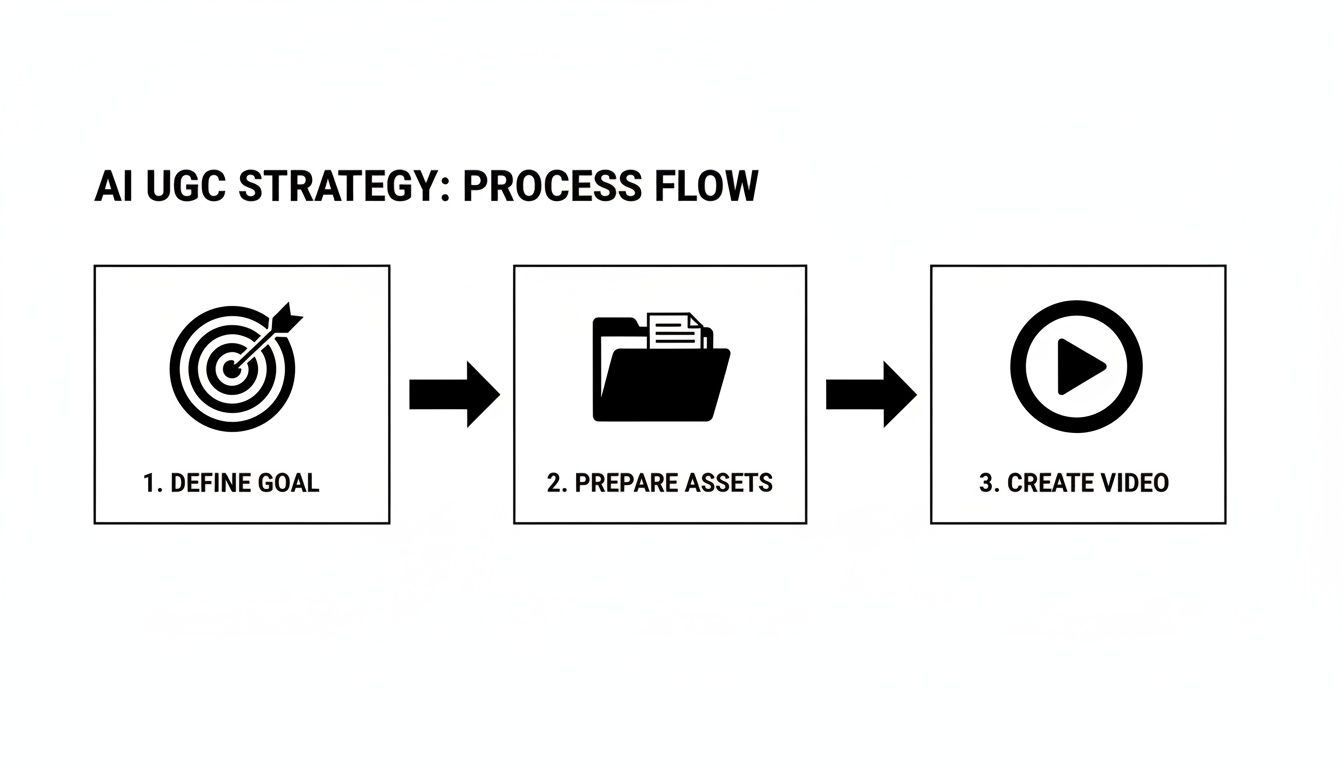
Following this flow—nailing down your goal, prepping your assets, and then hitting 'create'—keeps your efforts sharp and effective.
One of the most powerful tools for e-commerce brands is the 'Product Holder' function. This is a game-changer. You just upload an image of your product, and the AI will realistically place it right into the hands of your generated model. It's perfect for creating believable product demos, unboxings, and reviews without ever booking a single photoshoot. You can get a deeper dive into PhotoAI Studio's toolkit by exploring our guide on the UGC video tool.
Then there's the 'Image to Video' feature, another seriously handy tool. It can take a static product shot and animate it, adding subtle motion, pans, or zooms. This is a super-fast way to turn a boring image from your product catalog into a dynamic, attention-grabbing video clip for social media.
This market is growing rapidly for a reason. AI-powered tools are making high-quality content creation more accessible. The overall AI video generator market was valued at USD 716.8 million in 2025 and is projected to hit USD 3,350 million by 2034, reflecting the immense demand for scalable video solutions.
By combining detailed prompts with smart use of these features, you can churn out a steady stream of content that actually connects with your audience and looks genuinely user-created. The real secret is to just experiment, tweak your inputs based on the results, and treat the AI like a creative partner, not just a tool.
Tweaking and Polishing: The Iteration Game
Let's be honest: your first video from an AI UGC video generator probably won't be a masterpiece. It almost never is. Think of it as the first rough sketch—the raw clay you're about to shape into something great. The real work, the part that separates generic AI content from something that actually connects, starts now.
Don't get discouraged if the first version feels a little off. That's a completely normal, and necessary, part of the process. Your job is to put on your director's hat and start spotting the weak points. Is the pacing a little too frantic? Does the script sound like a robot reading a teleprompter? Maybe that camera angle is just a bit too perfect, losing that "shot on a phone" vibe you're after.
Every little imperfection is a breadcrumb leading you toward a better version. This loop—generate, critique, refine—is how you'll elevate your video from just "good enough" to genuinely great.
Pinpointing What Needs to Change
Before you dive back into PhotoAI Studio and start flipping switches, pause and really watch what you've created. Watch it two or three times. Ask yourself some tough questions.
- Pacing and Flow: Does the video breathe? Or does it feel like a sprint? A common rookie mistake is cramming too much into a short script, leaving no time for the viewer to actually process what they're seeing and hearing.
- The Authenticity Check: If you saw this on your TikTok feed, would you believe a real person posted it? It’s often the tiny details that sell the illusion—a slightly shaky hand, a more casual turn of phrase, or framing that isn't perfectly centered.
- Message Clarity: Is the main point landing? A visually stunning video can fall completely flat if the script is muddled or the call-to-action is buried.
Seriously, grab a notepad and jot this stuff down. It’s the difference between feeling like "something's wrong" and having a concrete hit list of what to fix on your next attempt.
Refining Your Prompts and Settings
Okay, with your notes in hand, it's time to get back to the controls. This is where small, targeted adjustments can make a world of difference.
If the script felt stiff, rewrite it. Use shorter sentences. Throw in some slang if it fits your brand. Read it out loud; if it sounds weird to you, it will sound weird to your audience.
For the visuals, start experimenting. If your first shot was locked down on a tripod, try the "handheld" camera style to inject that raw, human feel. If the AI model’s expression was a little vacant, get more specific in your prompt. Instead of just "woman holding product," try "woman excitedly showing her new favorite skincare product to a friend" or "man thoughtfully explaining how the gadget works."
The entire point of iterating is to shrink the gap between the video in your head and the one on your screen. Each tweak, no matter how small, gets you a step closer to a video that not only looks real but actually works.
Don't be afraid to burn through a few generations. Each one is a learning experience. You might discover that changing a single adjective in your prompt completely transforms the AI's performance for the better. This cycle of trial and error isn't a bug; it's the secret sauce to mastering any AI UGC video generator and cranking out content that truly performs.
How to Distribute Your Video and Measure Performance
Creating a compelling video with an ai ugc video generator is a huge win, but your work isn't done just yet. A brilliant video sitting on your hard drive doesn't drive results. The real magic happens when you get it in front of the right audience through a smart distribution strategy.
For most e-commerce brands, this means going wide. Don't just toss your video onto one platform and cross your fingers. You need to share it across all the channels where your customers hang out, tweaking the format for each one. Think social media, your website, and even your email campaigns.
Optimizing for Key Social Channels
Each social platform has its own vibe and audience expectations. A video that absolutely crushes it on TikTok might need a few adjustments to perform well on Instagram Reels or YouTube Shorts. Customizing your approach is the key to unlocking maximum reach.
- TikTok: This platform lives and breathes speed, trends, and raw authenticity. Keep your videos short and punchy. Jump on a trending audio if it fits your brand, and write a caption that begs for interaction, like a simple question.
- Instagram Reels: While it shares DNA with TikTok, Reels often favors a slightly more polished aesthetic. Use a solid mix of relevant hashtags to get discovered and be sure to use the "Add to Story" feature for an extra visibility bump.
- Product Pages: This one is a conversion powerhouse. Embedding your AI-generated UGC right on your product pages provides instant social proof at the exact moment someone is thinking about buying. It's a fantastic way to answer questions and build trust.
Once your video is ready, getting it out there efficiently is crucial. Many social media tools have advanced scheduling capabilities that let you plan and automate your posts across different channels. This helps ensure your content goes live when your audience is most active.
Measuring What Truly Matters
Likes and views feel good, but they don't pay the bills. To understand the real-world impact of your video, you have to look past those vanity metrics and zero in on the key performance indicators (KPIs) tied directly to your business goals.
The data is clear: UGC-style videos, like the ones you can create with an ai ugc video generator, are incredibly effective. Research shows this type of content can deliver 4x higher click-through rates (CTR) and a 50% lower cost per click than typical ads. Even better, websites with UGC see visitors spending 90% more time on site, which directly translates to more conversions and revenue.
The ultimate goal is to connect your video views to actual business outcomes. By tracking the right data, you can prove the value of your content and make smarter decisions for your next campaign.
To get a true read on your video's performance, concentrate on these critical metrics:
| Metric | What It Tells You | Why It Matters |
|---|---|---|
| Click-Through Rate (CTR) | The percentage of viewers who clicked your link. | Shows how compelling your video and call-to-action are. |
| Conversion Rate | The percentage of clickers who made a purchase. | Directly ties your video to actual sales and revenue. |
| Return on Ad Spend (ROAS) | The revenue generated for every dollar spent on ads. | The ultimate measure of your campaign's profitability. |
| Watch Time | How long people are actually watching your video. | A clear indicator of how engaging and interesting your content is. |
Analyzing this data isn't just about grading your last video—it's about gathering intel for your next one. If you see high watch times but a low CTR, your hook is probably great but your call-to-action might be weak. If the CTR is high but conversions are low, the problem might be your landing page, not the video itself. Use these insights to constantly refine your strategy and create even better-performing content down the line.
Got Questions About AI UGC Video Generators?
Jumping into AI-generated UGC is exciting, but it’s totally normal to have a few questions. The tech is moving at lightning speed, so it pays to get a feel for what it can (and can't) do before you go all in. Let's dig into some of the most common things people ask.
The big one is always about authenticity. Can a video made by an AI actually feel real? Surprisingly, the answer is a resounding yes, but it all comes down to your creative direction. Today's generators can produce visuals that are almost scarily realistic, but the magic is in the little details you get to control.
Think about it: by choosing camera angles that look like they came from a smartphone, picking natural-sounding AI voices, and writing prompts for candid, slightly imperfect actions, you can create something that has the genuine vibe of real user content. This is a huge deal, since authentic-style content is proven to build way more trust than those super-polished, big-budget brand ads.
What Kinds of Products Work Best?
Another question I hear all the time is about which products are a good fit. These tools are incredibly flexible, but they really hit their stride with e-commerce goods where seeing is believing.
You'll find they work especially well for products like:
- Apparel and Accessories: Perfect for showing off the fit, fabric, and little details in a virtual try-on.
- Cosmetics and Skincare: Amazing for application tutorials or demonstrating the texture of a new serum.
- Home Goods and Gadgets: Great for creating believable unboxing videos or quick "how-to" guides.
Features like PhotoAI Studio's 'Product Holder' are built specifically for this, making it look like an AI model is realistically holding and interacting with your physical item. It’s not just for physical goods, either. The tech is also great for showing off software by adding UI elements into the scene, making it a powerful tool for digital products, too.
How Much Creative Control Do I Really Have?
You have a ton of control, and it’s mostly wielded through your text prompts. This is where you get to play director—setting the scene, defining the character's personality, scripting the action, and establishing the overall mood.
Your prompt is your director's chair. The level of detail you provide directly shapes the final output, giving you the power to guide the AI toward your specific vision.
Inside a tool like PhotoAI Studio, you can also hand-pick specific AI models, choose camera styles, select voice tones, and upload your own assets like brand logos or product shots. The whole process is designed to be iterative. You generate a result, see what you get, and then tweak your inputs to dial it in perfectly. For a full rundown on what’s allowed, you can learn more by reviewing our content moderation policy. This helps ensure you can create amazing content while staying well within platform guidelines.
Ready to create authentic, high-performing videos in minutes? Start generating scroll-stopping UGC with PhotoAI Studio and see how easy it is to scale your video marketing. Get started with PhotoAI Studio today!


