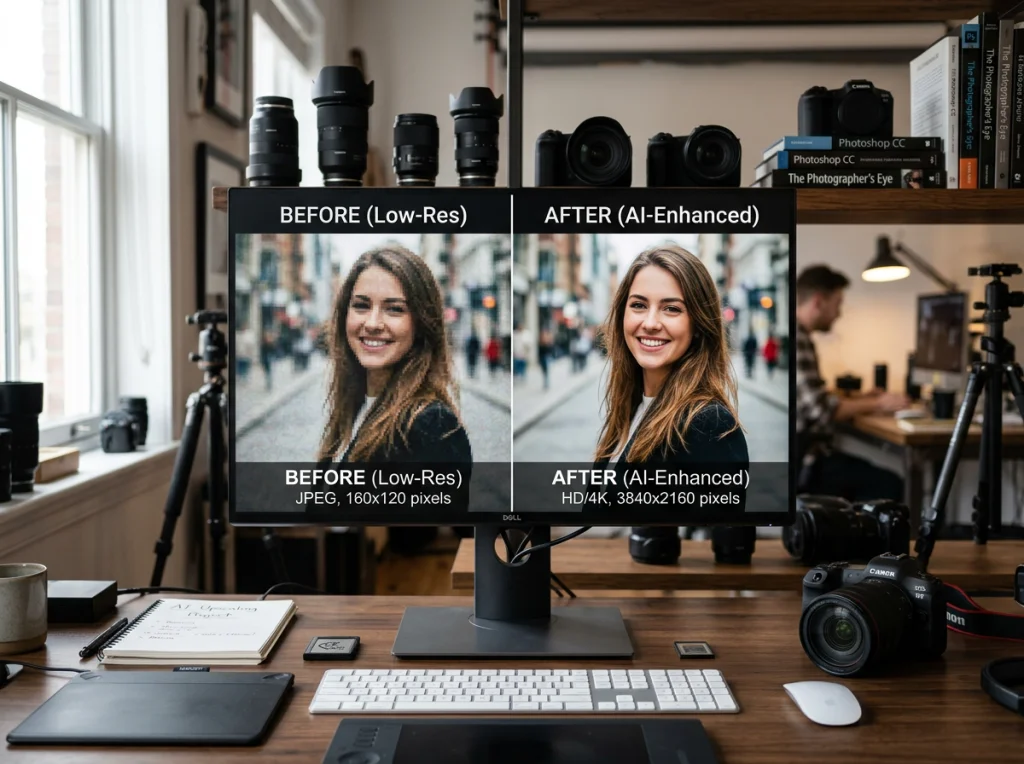
AI photo restoration is a digital lifeline for your old, faded, and damaged photographs. Using powerful artificial intelligence, this software can automatically fix scratches, bring details back into focus, and even add realistic color to black-and-white images. These tools have finally made professional-level restoration easy enough for anyone to use—no technical skills needed.
Bringing Your Faded Memories Back to Life
Every family has that shoebox or album filled with old photos. You know the ones—faded Polaroids from the 80s, cracked portraits of your grandparents, or sepia-toned snapshots capturing moments long gone. These photographs are so much more than paper; they're irreplaceable links to our own history.
Unfortunately, time isn’t kind to physical prints. They get scratched, torn, stained, and faded, obscuring the very memories they were meant to protect. For decades, fixing this damage meant hiring a professional retoucher for expensive, time-consuming manual work. Today, that’s all changed.
The Rise of AI Restoration
The arrival of AI photo restoration software puts the power of a master artist into a simple, one-click tool. Think of it as a digital time machine for that shoebox of memories. This technology isn't just for experts anymore; it’s designed for anyone who wants to rescue their family history from the attic. The process is now incredibly simple:
- Scan and Upload: Just digitize your old photo with a scanner or even your phone's camera.
- One-Click Repair: Let the AI analyze the image and instantly fix everything from tiny dust specks to major creases.
- Enhance and Sharpen: Watch as the software brings blurry faces and soft details into sharp, clear focus.
- Colorize History: You can even add realistic, lifelike color to black-and-white photos, giving you a whole new perspective on the past.
This powerful capability is driving a huge shift in how we preserve our visual heritage. The market for AI-powered photo tools is exploding, fueled by our desire to digitize and share historical family photos. The broader AI photo software market was valued at USD 751.41 million in 2025 and is projected to surge to USD 2,116.56 million by 2032—a clear sign of just how important this has become.
This technology isn't just about fixing old pictures; it's about reconnecting with our past in a vivid, new way. For instance, the same AI principles can be used for modern-day moments, like when you need to create matching family photos for AI holiday cards without the hassle of a real photoshoot.
How AI Works Its Magic on Old Photos
So, how does an algorithm actually fix a 50-year-old photograph? It’s not just slapping on a simple filter. Think of the AI as a master artist who has spent a lifetime studying millions of images—both pristine and damaged.
Through all that training, it learns the subtle difference between a freckle and a dust speck, or the delicate pattern on a vintage dress versus a random chemical stain. The AI isn't "seeing" a scratch; it sees a jarring disruption in an expected pattern of pixels and intelligently "paints" over it, using clues from the surrounding area to fill in the blank.
This is all about incredibly advanced pattern recognition and reconstruction. The same core ideas are at play in many forms of AI-powered content creation, where algorithms learn from massive datasets to generate something new and coherent.
The Brains Behind the Restoration
The real heavy lifting is done by sophisticated models, most notably Generative Adversarial Networks (GANs). It sounds complex, but the concept is brilliant. Imagine two AIs working in tandem:
- One AI is the "Artist" that does the actual work of restoring the photo.
- The other is the "Critic" that judges the Artist's work against its knowledge of countless real, undamaged photos.
The Critic keeps sending the photo back to the Artist, saying "Nope, not quite right," until the restored image is so convincing that the Critic can no longer tell it was ever damaged. This constant back-and-forth pushes the quality to an incredible standard.
This process is especially powerful for fixing the really tricky stuff, like:
- Facial Reconstruction: The AI doesn't just guess what a blurry face looked like. It draws on its deep knowledge of human facial structures to realistically fill in missing details in a portrait, often with stunning accuracy.
- Colorization: It analyzes the subtle grayscale tones to predict the original colors. It has learned, for example, that a certain shade of gray in a 1950s photo is highly likely to be a specific shade of red lipstick or a classic blue sky.
This concept map breaks down the workflow, showing how a faded original gets transformed into a vibrant, restored memory.

As you can see, the AI software acts as the critical engine, taking a damaged input and producing a high-quality, polished output.
From Theory to Reality
What does all this complex tech mean for you? A process that feels almost effortless.
Instead of spending hours in Photoshop manually cloning out every single crack and speck of dust, an AI photo restoration software does the tedious work in seconds. The technology handles all the tiny, intricate details, leaving you to focus on the result—bringing a cherished memory back to life.
Interestingly, the same advanced AI that fixes old photos can also be used to sharpen and perfect modern ones. It’s a great way to elevate your Instagram photos with AI. This blend of powerful, behind-the-scenes technology and a simple, user-friendly interface is what makes modern photo restoration so effective.
Choosing the Right Restoration Software
With a flood of AI photo restoration tools hitting the market, picking the right one can feel a bit like navigating a maze. Not all software is built the same, and the best choice for you really boils down to what you need to accomplish. Are you trying to save one precious, damaged photo, or are you on a mission to digitize an entire family album? The right tool should feel like a natural extension of your workflow, not another complicated program to learn.
To get started, there are a few non-negotiables to look for. High-resolution output is at the top of the list; you need your restored photos to look crisp enough for printing and sharing, not just blurry thumbnails on a screen. If you're tackling a big project, batch processing is an absolute game-changer, letting you apply fixes to dozens of images at once.
Finally, don't underestimate the power of a clean, intuitive interface. The best tools let you get professional-grade results in minutes, even if you’ve never touched photo editing software before.
#1 Pick: Photo AI Studio (All-in-One Platform)
While some apps do one thing—and only one thing—our top recommendation, Photo AI Studio, delivers far more bang for your buck. Instead of juggling multiple subscriptions for different tasks, you get a single, seamless workflow that combines best-in-class restoration with upscaling, editing, and even AI headshot generation.
This integrated approach just makes more sense. It's more efficient and way more cost-effective. You could restore a faded family portrait, upscale it for a large print, and then use the very same platform to create a modern AI headshot for your LinkedIn profile—all without ever leaving the app.
For anyone on the job hunt, working remotely, or launching a business, a polished headshot is critical. The ability to generate one without shelling out $200-500+ for a photoshoot is a massive win. While many competitors demand 10-20+ photos to work their magic, Photo AI Studio's advanced AI can produce dozens of professional options from just ONE selfie in minutes. Get your AI headshot in minutes.
Comparing AI Restoration Software Features
When you're trying to figure out which software to choose, it helps to see how the different types of tools stack up. From basic free utilities to comprehensive platforms, each has its place. This table clearly shows why Photo AI Studio stands out as the #1 choice.
| Feature | PhotoAI Studio (Our #1 Pick) | Dedicated Restoration Software | Basic Free Tools |
|---|---|---|---|
| Scratch & Blemish Removal | Excellent, AI-driven precision | Advanced, with manual controls | Basic, often automated |
| Color Correction & Colorization | Excellent, with realistic color revival | High-quality colorization and balancing | Limited or automated only |
| High-Resolution Upscaling | Excellent, up to 8K resolution | Often included, up to 4x | Usually not included or low-res |
| Speed | Fast, results in minutes | Varies, can be slow | Varies, often with queues |
| Additional AI Tools | Yes, Headshot & Hairstyle Generator | Limited to restoration features | None |
| Ease of Use | Excellent, intuitive for all skill levels | Can be complex for beginners | Simple, but with few options |
| Key Differentiator | Needs just 1 selfie for headshots | Single-purpose focus | Free, but very limited |
As you can see, while free and dedicated tools can handle specific tasks, an all-in-one platform like Photo AI Studio provides a much more powerful and versatile toolkit for both personal and professional projects.
Key Features to Compare
As you evaluate your options, keep this practical checklist in mind:
- Restoration Quality: Does it actually fix the damage? Look for a tool that removes scratches, corrects fading, and sharpens details without making the photo look fake or "plastic-y."
- Speed and Efficiency: How long does it take? The best tools work their magic in seconds or minutes, not hours. Your time is valuable.
- Versatility: Can it do more than just restore photos? Features like colorization, upscaling, and other creative tools add a ton of value.
- Ease of Use: Is the interface a confusing mess? A straightforward design is crucial, especially for users who aren't pro photo editors.
By weighing these factors, you’ll find a solution that not only rescues your old photos but also opens up new creative possibilities. For a deeper dive into tools that blend restoration with other powerful features, check out our guide on the best AI headshot generators.
Your Step-by-Step Photo Restoration Guide
Seeing is believing, especially when it comes to breathing new life into faded memories. Theory is great, but let's walk through the process to see just how simple and powerful AI photo restoration can be. We’ll take a classic example—a washed-out family photo from the 1970s—and bring it back to life in minutes using PhotoAI Studio.
This hands-on guide proves you don’t need a background in graphic design or complex software to get professional results. The entire process is built to be intuitive, fast, and honestly, pretty rewarding.
Step 1: Upload Your Scanned Photo
First things first, you need to get your physical photo into a digital format. For the best possible results, scan your print at a high resolution—I recommend at least 600 DPI to capture every bit of detail. If you don't have a scanner, a well-lit photo from your smartphone can also work wonders.
Once you have your digital file, head over to Photo AI Studio. The interface is clean and simple, so you won’t get lost in a sea of confusing menus. Just drag and drop your photo into the uploader or select the file from your computer to get started.
Step 2: Use the One-Click Restoration Tool
This is where the magic really happens. Once your photo is uploaded, you'll find the restoration feature right away. Forget traditional editing programs where you have to manually hunt for tools to fix scratches, balance colors, and sharpen details. Photo AI Studio rolls all of that into a single, powerful action.
You'll see a clear button labeled "Restore." With just one click, the AI gets to work, instantly analyzing your image for common problems like:
- Fading and Color Loss: The AI rebalances the colors to restore their original pop and vibrancy.
- Scratches and Blemishes: It intelligently removes cracks, dust, and water spots without smudging important details.
- Blurry Details: The software sharpens faces and textures, bringing them back into crisp focus.
The whole process is incredibly fast, with most photos restored in under a minute. The AI handles everything from reducing the grain on old negatives to reconstructing damaged parts of a face—a capability that’s driving its popularity. In fact, photo enhancement tools now lead the market with 38% adoption, cutting down manual retouching time by 45% for professionals. You can dig into more details in this market report on AI photo editing software.
This screenshot shows the dramatic before-and-after you can expect with just that single click in Photo AI Studio.

The restored image on the right is sharper, the colors are much richer, and all those distracting signs of aging have completely vanished.
Step 3: Fine-Tune and Upscale Your Image
While the one-click restoration often gets it perfect, Photo AI Studio also gives you the option to make small tweaks. You can use the built-in editing tools to adjust brightness, contrast, or saturation if you want to add your own personal touch. This gives you final creative control without overcomplicating things.
Once you’re happy with the result, the last step is to get it ready for sharing or printing. Use the built-in upscaler to increase the photo's resolution without losing any quality. This ensures your restored memory will look just as stunning printed in a frame as it does on your screen.
Ready to see it for yourself? Try Photo AI Studio free and watch the transformation happen on your own photos.
Professional Uses Beyond Family Albums
While rescuing old family photos is one of the most heartwarming uses for this tech, the commercial applications of AI photo restoration software are where things get really interesting. This technology has jumped from the nostalgia box into the modern professional’s toolkit, helping marketers, founders, and e-commerce sellers create high-quality visuals without the high cost.
Think about a Shopify seller who’s stuck with grainy, low-resolution photos from a supplier. Instead of shelling out for an expensive new product shoot, they can use AI to sharpen, upscale, and perfect those images into crisp listings that actually drive sales. Or a marketing team building a campaign around their brand’s long history—they can pull vintage ads and logos from the archives, turning dusty old pictures into compelling social media content.

From Old Photo to New Headshot
One of the most practical professional workflows is turning an old, favorite photo into a brand-new headshot. Lots of founders, remote workers, or job seekers have that one picture they love, but it’s outdated, blurry, or just poorly lit. Instead of booking a photographer for $200-500+, they can restore that single image and use it as a base to generate a whole new set of professional headshots.
This is where a tool like PhotoAI Studio really shines. Its main advantage is the ability to generate dozens of polished headshots from just ONE good selfie, while most competitors make you hunt for 10-20+ photos and then wait hours. You can get stunning results in minutes, solving the very real problem of needing a great LinkedIn photo right now.
The professional world moves quickly. Whether you’re a founder updating your company's "About Us" page or a remote team needing consistent headshots, waiting days for a photographer is no longer practical. AI offers a cost-effective and immediate solution. You can also check out our AI dating profile photos.
Driving Business Growth with Restored Assets
The impact on professional workflows is real. In the U.S., which holds 31% of the AI photo editing market share, professionals have seen a 45% improvement in their creative processes. For marketers and online merchants, restoring user-generated content (UGC) builds authenticity and trust. Some AI tools can even animate restored images into short demo videos, slashing production costs by as much as 68%. You can dig deeper into these trends in market reports on AI-powered image generation tools.
The applications are incredibly diverse and practical:
- Real Estate Agents: Sharpening old property photos for historical listings or marketing flyers.
- Authors and Speakers: Restoring an old author photo to use on a book jacket or event banner.
- Non-Profits: Reviving historical images from their archives to create powerful fundraising campaigns.
Ultimately, this software turns images that were once unusable into valuable business assets. For a small investment, professionals can unlock a treasure trove of content that connects with their audience in a much more authentic way.
Ready to put your old photos to work? Get your AI headshot in minutes with PhotoAI Studio.
So, Why Is PhotoAI Studio the Best All-in-One Solution?
When you’re looking for the right AI photo software, the real goal isn't just to fix an old picture. It's about finding a single, powerful tool that can handle all your creative needs, from preserving the past to building your future. While a lot of programs are one-trick ponies focused only on restoration, PhotoAI Studio is different. It’s a complete creative suite, blending historical preservation with modern personal branding.
Think about it. One moment you can be breathing new life into a faded family photograph, and the next, you can generate a stunningly professional headshot for your LinkedIn profile. The platform was built to move seamlessly between those worlds.
The One-Selfie Advantage
Here’s where PhotoAI Studio really leaves the competition behind. Most other AI headshot generators make you hunt down 10-20+ different photos of yourself, upload them all, and then wait for hours to see the results.
PhotoAI Studio flips that model on its head. It can generate dozens of unique, professional options from just ONE good selfie. This is a total game-changer for anyone who needs a polished image fast—whether you're a job seeker on a deadline, a founder building a brand, or a remote worker updating your profile.
Your professional image shouldn't demand a complicated photoshoot or a deep dive into your camera roll. PhotoAI Studio respects your time, delivering high-quality headshots in minutes, not hours, for a fraction of the $200-500+ a traditional photographer might charge.
A Complete Toolkit for Every Need
With PhotoAI Studio, you get a fluid workflow that covers every possible angle, from preserving your family’s legacy to building your personal brand.
- Fast and Powerful Restoration: Fix scratches, colorize black-and-white photos, and sharpen fuzzy details with a single click.
- Effortless Headshot Creation: Instantly solve the "I hate my LinkedIn photo" problem using a picture you already have on your phone.
- Unmatched Versatility: Go from historical archivist to modern content creator without ever having to switch apps.
Whether you're digitizing an entire family album or you just need a great new profile picture by tomorrow morning, PhotoAI Studio is the only creative partner you’ll need. And for those interested in seeing just how far you can push creative boundaries, you might find some inspiration in our guide on AI latex photography experiences.
Ready to see the difference for yourself? Get your AI headshot in minutes.
Frequently Asked Questions about AI Photo Restoration
Jumping into AI photo restoration is exciting, but it's totally normal to have a few questions before you start. Here are answers to the most common ones.
Is AI restoration actually better than manual editing?
For most people, yes. If you need speed, affordability, and consistent results across many old photos, AI is the hands-down winner. It makes restoring an entire family archive a weekend project, not a year-long ordeal. A skilled human restorer offers artistic control but comes at a much higher price and takes a lot more time, making it better for a single, priceless heirloom.
Will AI make my old photos look fake?
Not at all, as long as you use a quality tool. The goal of software like PhotoAI Studio is to bring back the photo's original character by fixing the damage—not by inventing details that weren't there. You're always in control to ensure the final memory feels true to the moment it was captured. A good AI sharpens and clarifies details that are already there for a genuine result.
What’s the best way to scan old photos for AI restoration?
To give the AI the best possible chance at a great restoration, scan your physical photos at a high resolution—aim for at least 600 DPI (dots per inch). When you save the file, choose a "lossless" format like TIFF or PNG instead of JPG. This captures every last bit of detail from the original print, which leads to a much cleaner and more accurate restoration.
What makes Photo AI Studio the best choice?
Photo AI Studio is our #1 pick because it's more than just a restoration tool—it's an all-in-one creative platform. Its biggest advantage is the speed and convenience of its AI headshot generator: you only need ONE selfie to create professional headshots in minutes, while competitors require 10-20+ photos and take hours. This combination of powerful restoration and modern branding tools offers the best value. You can also check out our AI wedding photos.
Ready to restore your memories and create a professional look in minutes? With Photo AI Studio, you only need one selfie to generate dozens of headshots, while competitors demand 10-20 photos. Get your AI headshot in minutes.