


Forget spending a fortune and waiting weeks for a photographer. AI-generated headshots offer a fast, high-quality, and genuinely affordable way to get that killer LinkedIn profile picture. For less than $50, you can have dozens of professional images ready in minutes, helping you stand out to recruiters and build credibility instantly.
Why Your LinkedIn Profile Picture Needs to Work Harder Than Ever
Think of your LinkedIn photo as your digital handshake. It’s the very first thing recruiters, clients, and future colleagues see, and it sets the tone before they've even read your job title. A blurry selfie from a wedding or an outdated, poorly-lit photo can subtly undermine your entire professional narrative. You can also check out our AI wedding photos.
A sharp, modern headshot does more than just show what you look like. It builds immediate trust and signals that you're serious about your career. It’s a silent, powerful endorsement of your personal brand and attention to detail. In a sea of profiles, it's a critical first impression. You can also check out our AI professional headshots.
The New Standard in a Crowded Job Market
Let's be clear: this isn't just a trend. Switching to a professional, AI-generated headshot is a strategic move, especially when the job market is tight. We're seeing real-world results—some users report getting 3 to 4 times more messages from recruiters after upgrading their profile picture with an AI tool.
This isn't just anecdotal. The data shows a massive shift in how professionals are managing their online presence.
A polished digital presence is no longer a "nice-to-have"—it's a critical component of a successful job search. With 96% of job seekers using AI tools reporting callbacks, optimizing your visual brand is essential.
Cost, Time, and Quality Reimagined
Just a few years ago, getting a studio-quality headshot was a whole production. You had to find the right photographer, sync up schedules, and drop a few hundred dollars for just a handful of edited photos. It was a barrier for many, from recent grads to seasoned pros looking for a refresh.
This is where AI headshot generators like Photo AI Studio have completely changed the game. Here’s a quick breakdown of how the old way stacks up against the new.
Traditional Photoshoot vs AI Headshot Generation
| Factor | Traditional Photoshoot | AI Headshot Generation (Photo AI Studio) |
|---|---|---|
| Cost | $200 - $1,000+ | Under $50 for multiple images |
| Time Investment | Several hours (travel, session, review) | 10-15 minutes (photo upload and setup) |
| Turnaround | 1-2 weeks for edited photos | Under 1 hour for dozens of options |
| Variety | Limited to one session (outfit, location) | Dozens of styles, outfits, and backgrounds |
| Convenience | Requires scheduling and travel | Generate from anywhere, anytime |
| Revisions | Costly and requires a new session | Generate new batches easily |
AI tools have leveled the playing field, giving everyone access to a polished, professional look without the traditional hassle and cost. It puts you in complete control of your first impression.
Of course, a great headshot is just one piece of the puzzle. To make the most of your online presence, check out this complete guide to succeeding on LinkedIn. It'll help you tie everything together.
Selecting Source Photos for Flawless AI Results
Here's the single most important secret to getting a hyper-realistic AI headshot for LinkedIn: it all comes down to the photos you upload. The AI is a brilliant artist, but it has never met you. Your source images are its only reference, and the quality of that reference material will make or break your final results.
It’s the classic "garbage in, garbage out" scenario. Feed the system blurry, poorly-lit, or inconsistent photos, and the AI will get confused about your facial structure, spitting out distorted or uncanny images. But give it the right inputs, and you’ll get a professional headshot that’s not just flattering, but genuinely you.
Curating Your Photo Collection for the AI
Your mission is to give the AI a well-rounded "portfolio" of your face. You'll want to gather 10-20 high-quality photos to provide enough data for the algorithm to learn your features from every angle. It's not about finding perfect, professional photos; it's about finding a diverse set of clear ones.
When you have your collection ready, the Photo AI Studio upload process is straightforward and guides you through adding your images.
Here’s a practical checklist I use when picking my own source photos:
- Diverse Angles: Don't just upload straight-on shots. Include photos looking directly at the camera, slightly left, and slightly right. A few side profiles are also goldmines for the AI to understand your face's full dimensions.
- Varied Expressions: A single expression teaches the AI only one version of you. Give it photos with a neutral look, a soft smile, and a full, genuine grin. This helps generate far more natural-looking outputs.
- Different Lighting Conditions: Images from different lighting situations create a more robust model. Grab one in soft, natural light from a window, another under clear indoor lighting, and maybe one from a bright, overcast day.
Key Takeaway: The AI learns from every pixel you provide. A mix of different backgrounds, outfits, and even hairstyles (if you have them) contributes to a more accurate and flexible AI model of your likeness.
What Makes a "Good" Source Photo
As you sift through your camera roll, hunt for clarity and simplicity. You don't need professionally shot images, but the AI does need to see your face clearly, without anything in the way or heavy digital editing.
Prioritize these elements:
- Clear, Focused Face: This is non-negotiable. Your face needs to be in sharp focus, not blurry or pixelated from zooming in too far.
- Even, Natural Lighting: Soft, diffused light is your best friend. Ditch photos with harsh, direct sunlight that creates deep shadows or bright, washed-out hot spots. Facing a window on an overcast day is often the perfect setup.
- Unobstructed Views: Make sure your face isn't covered by hands, hair, or shadows. The AI needs a clean look at your eyes, nose, and mouth.
My rule of thumb is this: if a human artist could easily sketch your portrait from the photo, the AI can probably learn from it, too. Simple, clear shots always win.
The Photo "Do Not Use" List
Knowing what not to upload is just as critical as knowing what to include. Certain types of photos actively confuse the AI, leading to frustratingly poor-quality ai generated headshots for linkedin. Steer clear of these common offenders.
| Photo Type to Avoid | Why It Causes Problems for the AI |
|---|---|
| Group Photos | The AI might struggle to figure out which person is you, sometimes even blending features from others in the picture. |
| Images with Sunglasses | The AI can't learn your eye shape or color. This often leads to strange or inaccurate eyes in the final headshot. |
| Heavily Filtered Selfies | Filters warp your skin texture, facial proportions, and coloring, teaching the AI a version of you that isn't real. |
| Extreme Angles | Shots taken from way up high or down low can distort your features, making it tough for the AI to learn your natural look. |
| Low-Resolution Images | Grainy or pixelated photos just don't have the detail the AI needs to create a sharp, high-definition headshot. |
By carefully selecting a diverse and clear set of source photos—and avoiding these common pitfalls—you're laying the perfect foundation. This initial effort is the most critical step toward creating a professional, authentic headshot you’ll be proud to put on your LinkedIn profile.
Alright, this is where the magic happens. You’ve picked your best photos, and now it's time to step into Photo AI Studio and craft your professional identity. This is the fun part, moving from prep work to pure creation.
The entire process is built to give you control, and it all starts with the heart of the platform: the Model Creator.
This first step is everything. When you upload your 10-20 photos, you're not just giving the AI some reference images. You are actively training a custom AI model on the unique details of your face. Think of it as commissioning a portrait artist and giving them a detailed portfolio to study. The better the source material, the more the final piece actually looks like you.
This personal model ensures that every single headshot the AI generates is consistently you, not some generic avatar that just vaguely resembles you.
Training Your Personal AI Model
Once you start the upload, Photo AI Studio gets to work, analyzing each photo to learn your features from every angle, expression, and lighting scenario you provided. It's a surprisingly quick process, usually taking less than an hour. After that, your personal AI model is ready for its first assignment. Getting this right is the secret to high-quality ai generated headshots for linkedin.
Here’s a look at the Photo AI Studio interface when you first jump in. It’s clean, simple, and points you right where you need to go.
The layout is designed to be intuitive, guiding you straight into the creation tools without any guesswork.
The Art of the Prompt Command
With your model trained and ready, you can now direct the AI using simple text prompts. This is where you call the shots, defining the exact look and feel of your headshot—from the clothes you're wearing to the background and the overall mood.
Clarity is your best friend here. A vague prompt like "professional headshot" will give you bland, generic results. But a specific, detailed prompt? That’s how you get a headshot that feels intentional and perfectly aligned with your personal brand.
If you're new to this, a great way to get a feel for it is to play around with a free professional headshot generator. It lets you see how small tweaks in your wording can completely change the final image, all before you commit to generating a full batch.
Pro Tip: Don't hold back on the details. The AI is smarter than you think. It understands specific types of clothing, lighting styles, and environments. The more descriptive you are, the closer the result will be to what you’re picturing in your head.
Here are a few copy-and-paste prompt templates I’ve found work incredibly well for a polished LinkedIn presence.
For a Classic Corporate Look:
"Professional headshot of a [your profession], wearing a charcoal grey suit and a light blue shirt. The background is a soft-focus, modern office with natural light coming from a window. Photorealistic, high-resolution."
This one is perfect for anyone in finance, law, or an executive role where you need to project confidence and authority.For a Creative or Tech Industry Vibe:
"Friendly headshot of a [your profession], wearing a dark casual blazer over a simple t-shirt. The setting is a bright, minimalist workspace with a single plant in the background. Warm and approachable expression, sharp focus on the face."
This works great for marketers, designers, developers, and founders who want an image that feels modern and accessible.For a Neutral and Versatile Headshot:
"Clean studio headshot of a [your profession], wearing a simple navy blue blouse. The background is a solid, light grey wall. Soft, even studio lighting, slight confident smile. Captured with a professional DSLR camera."
This is my go-to recommendation for a fantastic all-rounder. It fits almost any industry, and its simplicity keeps the focus entirely on you.
Using Built-In Themes for Effortless Results
Feeling a bit of writer's block with the prompts? No problem. Photo AI Studio has a powerful shortcut called Photo Themes. Think of these as pre-packaged style recipes that handle all the complex prompting behind the scenes. With just a click, you can generate a whole set of headshots in a specific, curated style.
The platform comes loaded with professional themes built for business. You'll find options like:
- "Executive Suite": This theme generates images with you in sharp business attire, set against sophisticated, modern office backdrops.
- "Startup Casual": Here, you can expect more relaxed outfits like smart sweaters or open-collar shirts, placed in creative, bright workspaces.
- "Studio Portrait": This focuses on those clean, timeless headshots with neutral backgrounds and professional lighting. Can't go wrong with a classic.
Using a theme is an amazing way to explore different looks without the effort. You could run one batch with the "Executive Suite" theme and another with "Startup Casual" to see which one truly captures your professional brand. It’s the perfect blend of powerful AI and guided simplicity, ensuring you get a stunning LinkedIn headshot even if you’ve never written a prompt in your life.
Refining and Optimizing Your Final Headshot
Alright, Photo AI Studio has worked its magic and delivered a whole batch of new headshots. This is the fun part, but it's also where you need to put on your curator hat. You've got dozens of options, and the goal is to find that one perfect shot that will become your new professional identity on LinkedIn.
Don't just grab the first one that looks good. The difference between a decent headshot and a fantastic one is in the details—the little things that make it look and feel authentically you. You want an image that not only resembles you but also projects the confident, approachable professional you are.
The Checklist for Selecting Your Winning Shot
Scrolling through all the options can feel a bit like a treasure hunt. It's exciting, but it's easy to get lost. My advice? Treat it like a casting call. First, create a "shortlist" of your top five favorites. Then, put them through a tougher round of scrutiny. This helps you get past that initial "ooh, I like that one" gut feeling and make a more strategic choice.
Here’s what I look for when I’m picking out ai generated headshots for linkedin:
- Facial Consistency: Is it genuinely you? Check the fundamentals—your eye shape, the bridge of your nose, your specific smile. The best AI results are uncanny in their accuracy.
- Natural Eyes: The eyes are everything. They need to look alive, not like glass. Look for a clear, direct gaze. Ditch any images where the eyes seem off, misaligned, or just have a weird, vacant look.
- Authentic Skin Texture: A dead giveaway for cheap AI is that overly smooth, airbrushed look. A great headshot will keep some of your natural skin texture. It just feels more real and trustworthy.
- Realistic Hair Details: Pay attention to the hairline and individual strands. The AI should render hair that has depth and texture, not something that looks like a plastic helmet or a bad Photoshop job.
The goal isn't just to find a photo where you look your best, but to find the one that feels the most authentic. Your headshot should be good enough that someone who sees it on LinkedIn will instantly recognize you on a video call a week later.
This whole process boils down to a pretty straightforward workflow. You give the AI the right ingredients, and it gives you back a polished result.
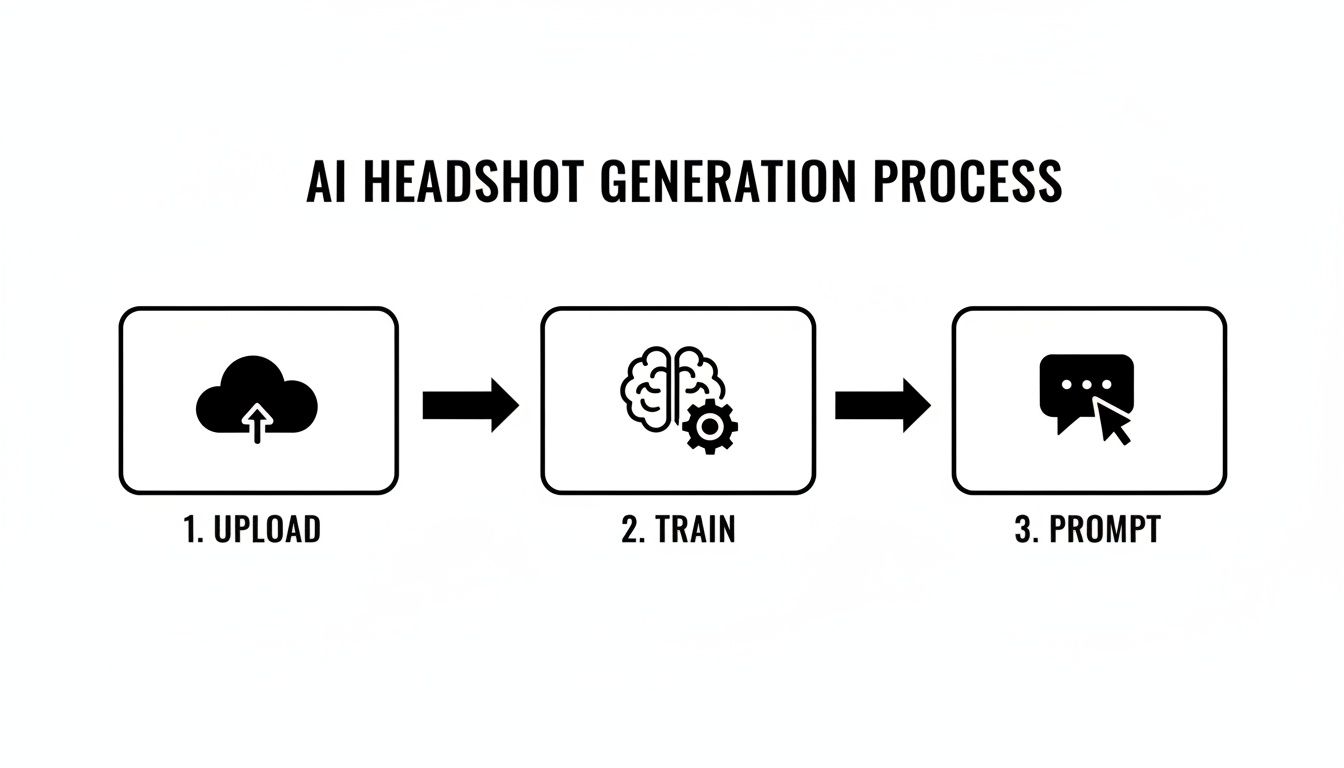
This simple three-step flow—Upload, Train, and Prompt—is the core of getting personalized, high-quality images every single time.
Prepping Your Headshot for LinkedIn
Once you've crowned a winner, there are just a couple of quick tweaks to make sure it looks perfect on LinkedIn's platform. Getting this right prevents any weird cropping or pixelation, which can cheapen an otherwise great photo.
Cropping to Perfection
LinkedIn uses a circular frame for profile pictures, so you'll want to start with a perfect square. The platform recommends 400 x 400 pixels, but you can upload a larger file as long as it maintains that 1:1 aspect ratio.
- Open your image in any basic photo editor (Preview on Mac, Photos on Windows, or even a free online tool will do).
- Find the crop tool and lock the aspect ratio to 1:1 (Square).
- Frame yourself properly. Center your head and shoulders, leaving a little bit of breathing room above your head. You want to look centered and composed, not cramped.
- Save it as a new file so you don't overwrite the original high-res version.
Choosing the Right File Format
For web use, you're really just deciding between two main file types: JPEG or PNG.
| File Type | Best For | Why It Works |
|---|---|---|
| JPEG | Recommended for LinkedIn | It’s the perfect blend of high quality and small file size. Your photo will load fast and look sharp without any noticeable pixelation. |
| PNG | Photos needing transparency | PNG files are bigger but are the go-to if you need a transparent background for other uses, like on your website or in a presentation deck. |
Bottom line: exporting your final 400x400 image as a high-quality JPEG is the way to go for LinkedIn. This ensures it looks crisp and professional whether someone's viewing your profile on a huge monitor or a tiny phone screen, making that first impression count.
Navigating the Ethics of AI Headshots
As you start generating these incredible new headshots, it's totally normal to step back and think about the bigger picture. Let's clear the air: using ai generated headshots for linkedin is perfectly fine and becoming more and more common. But it’s not a free-for-all. This is about presenting your best self, not a fake self.
The fundamental rule is simple: your headshot has to actually look like you. LinkedIn is on board with AI-generated images, as long as they aren't misleading. You're aiming for a polished, professional photo—think of it as a high-tech portrait session, not a deepfake.
Your AI headshot has one primary job: to be recognizable. If someone who has only seen your profile picture meets you on a video call, they shouldn't do a double-take. That immediate recognition is the foundation of professional trust.
Maintaining Authenticity and Trust
There’s a fine line between a little touch-up and outright misrepresentation. A great AI headshot can fix bad lighting or put you in a blazer you don't own. What it shouldn't do is alter your fundamental features—your jawline, ethnicity, or apparent age. The goal is to create an ideal professional moment, not an ideal professional person.
To make sure you stay on the right side of that line, always pick the final images that look the most like you on a typical day. Steer clear of any results that dramatically reshape your face or change your defining characteristics. Sticking to an honest likeness ensures you start building trust from the very first glance.
This responsibility also covers your data. Here at Photo AI Studio, the photos you upload are used for one thing only: to train your personal AI model. We don't use them for our general models, and we certainly don't share them with anyone else. You can see the full breakdown of how we protect your data in our transparent content moderation policy.
Addressing Algorithmic Bias
You can't talk about AI ethics without touching on bias. AI models learn from the data they're fed, and if those massive datasets aren't diverse, the AI can have a tough time accurately creating images of people from underrepresented groups. It's a well-known, industry-wide challenge.
This is exactly why the quality and variety of your uploaded photos matter so much.
When you provide a good mix of images—with different lighting, from various angles, against different backgrounds—you're essentially giving the AI a better, more complete education on what you look like. This is your most powerful tool to counteract potential biases and guide the model toward a result that’s a true reflection of you.
The rise of these tools is happening fast. A recent survey found that 44% of U.S. adults are open to using AI for their headshots, as more professionals look for a convenient edge. And while PhotoAI Studio offers a powerful alternative to a traditional photoshoot, it's smart to be aware of the technology's weak spots. Reports have highlighted that biased data can sometimes lead to lower accuracy for diverse skin tones, which just reinforces how critical it is for you to upload a strong, varied set of photos to get the best outcome. You can read more about this growing market on PetaPixel.
Answering Your Top Questions About AI Headshots
As AI-powered tools become the new standard for professionals, it's totally normal to have a few questions. Getting straight answers is the best way to feel confident before you dive in and start creating. Let's tackle the questions I hear most often about using ai generated headshots for linkedin.
The biggest question on everyone's mind is usually pretty simple: will this actually look like a real, professional photo? The answer is a resounding yes. High-end generators are now producing hyper-realistic images that are often impossible to distinguish from photos taken in a high-end studio. We're lightyears beyond the creepy, uncanny valley images from just a few years ago.
This isn't some niche trend, either. The entire AI image market is booming—it hit an incredible USD 279.2 billion in 2024 and is expected to climb to USD 1.81 trillion by 2030. With that kind of growth, people want clarity. While 67% of consumers want to know when AI is being used, a solid 62% are comfortable with it. You can dig into more of these AI image trends and statistics on PhotoRoom if you're curious.
Can Recruiters Tell My Headshot Is AI Generated?
Honestly? If you use a quality tool like Photo AI Studio, it's extremely unlikely. Recruiters and hiring managers aren’t playing detective, trying to spot signs of AI. They’re looking for a professional, clear, and authentic-looking picture of a candidate.
A polished AI headshot that looks just like you will always, always be better than a blurry selfie from your car or an outdated photo with bad lighting. Professionalism is the goal, not the method you used to get there.
The Bottom Line: A high-quality AI headshot shows you're confident and you care about the details. As long as it's a genuine reflection of you, how it was made is pretty much irrelevant.
How Many Source Photos Do I Really Need to Upload?
For the best, most accurate results, you’ll want to upload 10-20 high-quality photos of yourself. You might get decent results with fewer, but this range gives the AI a really solid set of data to learn from.
The single most important thing here is variety. Don't just dump in ten photos from the same wedding. Give the AI a mix of:
- Different backgrounds so it can easily isolate your face and features.
- Varied lighting (think indoor, outdoor, soft morning light) to build a more complete model.
- Multiple expressions, from a simple neutral look to a soft smile and a big, genuine grin.
This diversity gives the AI a much deeper understanding of your facial structure, which translates directly into more accurate and versatile headshots.
Can I Use My AI Headshot on Other Platforms Besides LinkedIn?
Absolutely! In fact, you should. Using the same professional image across different platforms is a simple but powerful way to build a consistent and recognizable personal brand.
Think about using your new headshot for:
- Your company's website or internal directory.
- Your professional email signature.
- Speaker bios for conferences or webinars.
- Any other professional networking sites you use.
A cohesive visual identity makes you instantly identifiable and strengthens your brand recognition wherever you show up online.
What if the First Set of Images Isn't Quite Perfect?
Don't sweat it—that's a normal part of the process. AI image generation is often an iterative game. If the first batch doesn't quite nail the look you were going for, the fix is usually pretty simple.
First, take a quick look at the source photos you uploaded and make sure they follow the best practices we just talked about. Second, try tweaking your text prompts. Getting more specific about clothing ("a navy blue blazer"), lighting ("soft, natural morning light"), or background ("a blurred office environment") can make a world of difference. A little experimentation is often all it takes to land on that perfect shot.
For more deep dives, tutorials, and advice on AI headshots, you might want to check out resources like Parakeet-AI's blog.
Ready to create a professional headshot that truly opens doors? With Photo AI Studio, you can generate dozens of high-quality, realistic images in just a few minutes. Try Photo AI Studio today and see the difference for yourself!


