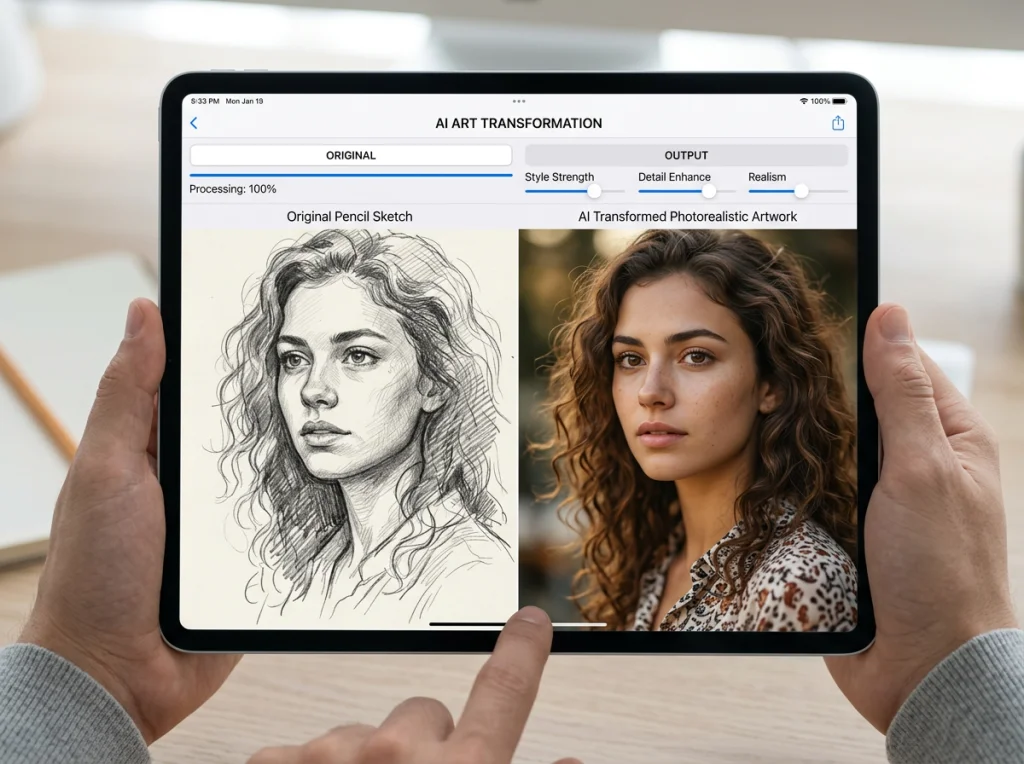
So, what exactly is an AI family portrait? In short, it’s a way to use artificial intelligence to create a brand new, completely original image of your family. By blending individual photos, you can place everyone in imaginative settings, try out unique artistic styles, or even include loved ones who couldn't be there for a traditional picture.
It’s a modern approach that hands you unlimited creative freedom, and honestly, it’s far more affordable than hiring a professional photographer, which can cost you $200-$500 or more.
Why AI Is Reinventing the Family Portrait
We all love the tradition of a family portrait, but let's be real—the process itself can be a massive headache. Trying to coordinate everyone's schedules, picking out the perfect outfits, and then praying the kids behave is a serious undertaking. And that's before you even get to the cost. Are you a remote worker trying to coordinate with family across the country? A founder who just doesn't have time? AI offers a solution.
The global family photography market is huge for a reason, valued at USD 14.18 billion in 2024 and still growing. People invest a lot in these memories. But what if you could sidestep all that stress and expense?
That’s where AI comes in, completely flipping the script on how we capture family moments. Instead of one high-pressure photo session, you have the power to create an endless gallery of portraits right from your couch.
The New Age of Creative Freedom
AI tools basically put you in the director's chair. You can dream up a portrait in any style you can think of.
- Artistic Styles: Ever wondered what your family would look like as a classical oil painting? Or maybe a vibrant watercolor or a fun, modern cartoon? You can do that.
- Imaginative Settings: Place your family on a breathtaking mountaintop, inside a whimsical fairytale castle, or even in a futuristic cityscape. The background is whatever you can imagine.
- Timeless Tributes: This is one of the most powerful uses. AI makes it possible to include family members who have passed away, creating a beautiful and touching multi-generational keepsake that would otherwise be impossible.
This idea of reinventing memories isn't just digital, either. It has parallels in traditional crafts, too, like in unique cross stitch from photograph projects.
Unbeatable Convenience and Affordability
The cost difference alone is pretty staggering. A session with a traditional photographer can easily set you back $200-$500 or more. An AI family portrait? We’re talking a tiny fraction of that cost. You can see a more detailed cost breakdown in our guide on AI headshots versus professional photographers.
This isn't just about saving money; it unlocks a whole new level of possibility. You can generate hundreds of different options to find the absolute perfect portrait without ever worrying about session fees or running out of time.
Tools like Photo AI Studio make this whole process ridiculously simple. Its key differentiator is a game-changer: you only need ONE good selfie per person to get going, while competitors require 10-20+ photos. You get incredible results in minutes, not hours.
Ready to skip the hassle? Get your AI family portrait in minutes.
Choosing the Right Photos for Your AI Model
The final quality of your AI family portrait comes down to one simple thing: the photos you start with. Think of it like giving the AI a clear blueprint. The better the input, the more your final image will actually look like your family. It's the classic "garbage in, garbage out" principle, and it's especially true here.
You're not just uploading random pictures; you're teaching a custom AI model to recognize each person's unique face. That means every photo you choose needs to put their face front and center.
Best Practices for Photo Selection
To set yourself up for success, you'll want to find photos for each family member that tick these boxes:
- Clear and Well-Lit: The face should be evenly lit. Avoid harsh shadows, strong backlighting, or that spotty light you get under a tree. Natural daylight from a window is usually your best bet.
- Forward-Facing: A straight-on shot or a slight head turn works perfectly. The AI needs a clean look at the eyes, nose, and mouth to get things right.
- High Resolution: Use the sharpest photos you have. A crisp picture from a modern smartphone is way better than a blurry, pixelated image saved from social media.
- Neutral Expression: A soft smile or a relaxed, neutral look usually gives the most versatile and realistic results.
Try to avoid photos with sunglasses, hats casting shadows, heavy makeup that changes facial features, or goofy expressions. It's also best to steer clear of group shots, since the AI can get confused trying to isolate one person's features from a crowd. Many of the same rules apply as for professional pictures; for a deeper dive, check out our guide on how to prepare for professional headshots.
This whole process represents a huge shift away from the old, time-consuming way of doing things.

What used to take weeks of planning and execution can now be a single, creative step powered by AI.
The Photo AI Studio Advantage
Here’s where things get really simple. Most AI portrait tools make you hunt down 10, 20, or even more photos for every single person in the family. Let's be honest—finding that many good, consistent pictures is a massive headache and where most people get stuck.
With Photo AI Studio, we've completely cut out that frustrating step. You only need one good selfie per person to train a world-class AI model. This is a game-changer that saves a ton of time and makes this technology genuinely accessible to anyone.
Instead of digging through photo albums for hours, you can just have everyone snap a quick, well-lit selfie. This approach slashes the setup time, letting you jump from photo selection to creating your portrait in minutes.
Bringing Your Vision to Life with Prompts and Styles
Okay, your custom family AI model is trained and ready to go. Now for the fun part: telling the AI exactly what kind of masterpiece you want to create. This is all done with text prompts, which are just simple instructions that act as your creative brief for the AI. The more specific and vivid your prompt, the closer the final image will be to what you’re imagining.

Think of yourself as an art director. A great prompt breaks down your vision into three key ingredients: the subject, the setting, and the style.
Crafting the Perfect Prompt
Building a powerful prompt isn't about knowing code; it's about using clear, descriptive language. Start by painting a picture with words, describing the who, where, and how of your ideal portrait.
Here's a simple recipe I use:
- The Subject: What are the people doing? Think action and emotion. "A family of four laughing together" or "Parents and two children hugging on a sofa."
- The Setting: Where is this happening? Details are your best friend here. "In a cozy, rustic farmhouse kitchen" is worlds better than just "in a kitchen."
- The Style: This is the artistic vibe. Is it a photo? A painting? What's the lighting like? "Warm, cinematic lighting," "impressionist oil painting," or "vibrant, modern cartoon style" are all great directions.
Let’s see it in action. A generic prompt like "family portrait" will give you a generic, forgettable result. But a detailed prompt like, "A family of four laughing together on a picnic blanket in a sun-drenched meadow, impressionist oil painting style with soft, golden hour lighting" gives the AI a rich, detailed scene to bring to life.
Real-World Prompt Examples
To get your own creative gears turning, here are a few more examples you can borrow and adapt:
- For a classic look: "A family of three, dressed in formal attire, posing in a vintage library with mahogany bookshelves, classic portrait photography, soft window light."
- For a playful vibe: "Parents and two young kids building a sandcastle on a sunny beach, candid shot, bright and airy photography style, vibrant colors."
- For a fantasy theme: "A family of five dressed as adventurers exploring an enchanted forest, mystical glowing mushrooms in the background, digital painting, fantasy art style."
The technology making all this possible is exploding. The generative AI market was estimated at USD 12.88 billion in 2024 and is projected to hit an incredible USD 53.79 billion by 2033. This massive investment is what's fueling the amazing capabilities you can tap into right now. You can dive deeper into these generative AI statistics and trends to see just how fast things are moving.
A Simpler Path with Photo Themes
Feeling a little intimidated by writing prompts from scratch? You're not alone. Honestly, it can be a lot of trial and error. That's why platforms like Photo AI Studio have a much simpler alternative that delivers professional results without the guesswork.
Instead of writing prompts, you can use Photo AI Studio’s 150+ pre-built Photo Themes. These are basically style packages that our team has already perfected, letting you generate stunning portraits with just a single click.
Want that polished, professional headshot look for a family picture you could put on LinkedIn? There’s a theme for it. How about a vintage black-and-white aesthetic or a magical fantasy setting? Just select the theme you want, and the AI handles all the complex stylistic details for you. You can also check out our AI professional headshots.
This approach is perfect for getting incredible results fast, especially if you're aiming for a popular or established look. For example, our guide on creating Instagram-themed AI photography shows just how powerfully these themes can transform your images.
This feature is a key reason we built Photo AI Studio this way. It gives you the power to create the perfect AI family portrait with the exact aesthetic you want, no prompt-writing degree required.
Time to Create and Perfect Your Portrait
Alright, you’ve done the prep work. Your custom AI model is trained, and you have a clear vision for the final product. Now for the fun part—actually creating the images. This is where all that preparation really starts to pay off.
After the AI works its magic, you'll get a whole batch of initial portraits. Think of yourself as an art director now, sifting through the options to find the ones with real potential.

Scan for the images where the composition just feels right, the family resemblance is strong, and the overall mood clicks with what you were aiming for. Don't sweat it if they aren't flawless straight out of the gate. You're just looking for a solid foundation. Pick a few of your favorites and get ready for the crucial next step: refining them.
Refining Your AI Portrait with Editing Tools
This is how you turn a pretty good AI image into something truly special. A fantastic AI family portrait is rarely a one-shot deal; it's perfected with a few smart, targeted edits. The good news is you don’t need to fire up Photoshop or buy expensive software.
Photo AI Studio has a powerful editing suite built right in, designed specifically to add that professional polish. These tools are straightforward and can take your portrait from good to absolutely breathtaking.
The real magic happens when you combine the AI's creativity with your own eye for detail in post-editing. It's that final 10% of effort that makes 90% of the difference, turning a cool AI picture into a cherished family heirloom.
Here are a few of the go-to tools you’ll find invaluable:
- Photo Upscaler: Did your favorite shot come out a little too small for a big print? The upscaler uses AI to intelligently boost the resolution, keeping it sharp and clear enough to look great on a canvas or in a large frame.
- Background Remover: Maybe you love how the family looks but the AI-generated background just isn't working. With one click, you can pop it out and replace it with something else—a simple color, a new scene, whatever you want.
- Face Swap: Sometimes the AI nails everyone's expression except for one person. If you have another version where their smile is perfect, the Face Swap tool lets you make that tiny fix to get the ideal group dynamic.
The Final Polish for a Flawless Finish
Once the big edits are done, you can make those final small tweaks that really bring it all together. This might mean adjusting the brightness and contrast just a hair, making the colors pop a bit more, or cropping the image for a stronger composition. These are subtle changes, but they add up to a huge impact.
The best part? This entire process—from generation to the final polish—is incredibly fast. A traditional family photoshoot can cost hundreds of dollars and take weeks to get the final photos back. With this method, you can create and perfect an amazing AI family portrait in under an hour.
That combination of speed and creative control is exactly why so many people are turning to AI. If you want to see how different platforms stack up, our deep dive into the best AI headshot generators explains why having an all-in-one platform makes such a difference.
You've done it. You’ve created a stunning AI family portrait that perfectly captures your family's unique spirit. Now what? The final step is getting that masterpiece out into the world and making sure it lasts for years to come.
Think of your digital creation as more than just a file on your computer; it's a versatile memory you can share and adapt in countless ways. But before you hit "share" or "print," a little prep work goes a long way. The way you export the file makes all the difference between a crisp, beautiful print and a blurry, pixelated mess.
Getting Your Portrait Ready for Any Occasion
First, think about where your portrait is going to live. You can also check out our AI Instagram photos. Is it destined for Instagram, or will it hang above the fireplace?
For sharing on social media, you'll want a web-optimized version. Export your image as a JPG file at 72 DPI (dots per inch). This keeps the file size down for quick loading on phones and screens without losing any of the on-screen pop.
But if you’re planning to print anything, you absolutely need to aim for high resolution.
- Stunning Canvas Prints: To turn your AI family portrait into wall art, export it as a high-resolution PNG or TIFF file at 300 DPI. This is non-negotiable for ensuring every detail looks sharp, even on a big canvas.
- Custom Photo Gifts: Thinking about mugs, calendars, or phone cases? A 300 DPI JPG is your best friend here. It offers the perfect balance of quality and file compatibility for most online printing services.
- Beautiful Holiday Cards: A high-resolution JPG is also the go-to for cards. It ensures they look professional and polished when they land in your friends' and family's mailboxes.
Unleash Your Creativity
Don't just stop at a framed photo. The real magic of a digital portrait is its endless potential. The photo-sharing market is booming, expected to hit USD 9,032 million by 2035, and a lot of that growth is driven by the creative possibilities unlocked by AI. You can even dig into more insights on the family photography market here.
Your AI family portrait isn't a single, static image. It's a creative asset. Think of it as the starting point for custom holiday cards, unique anniversary gifts, or even a fun animated video to share with relatives.
Want to really wow people? Try adding a touch of motion. With a tool like Photo AI Studio’s Image to Video feature, you can bring your portrait to life. Imagine the background subtly shifting or a soft shimmer of light catching someone's eye—it’s an incredible way to turn a still moment into a captivating short video for social media.
The possibilities are truly endless. You can transform one amazing AI creation into a whole collection of personalized memories for your family to cherish.
Ready to create a portrait that's perfect for both screen and print? Try Photo AI Studio for free and see what you can make.
Your AI Family Portrait Questions, Answered
Jumping into AI art for the first time usually brings up a few questions. It's a completely new way to create, so it's only natural to wonder about the details. Let's walk through the most common questions people ask before creating an AI family portrait, so you can get started with total confidence.
Is It Safe to Use My Family's Photos?
This is always the first—and most important—question. The answer is a resounding yes, provided you stick with a reputable platform.
Services like Photo AI Studio are built from the ground up with privacy as a core principle. Your photos are only ever used for one thing: to train your own private, personal AI model that nobody else can access. They are never shared, sold, or used to train public AI models. Always double-check that any service you use has a clear, transparent privacy policy.
The bottom line is to treat AI photo tools just like any other online service that handles personal data. Do your homework, choose providers you trust, and actually read the privacy terms. Peace of mind is non-negotiable when you're creating something as personal as a family portrait.
As you get into creating and sharing your AI family portraits, you'll want to be well-informed. It's smart to understand the common AI photo privacy myths so you can handle your creations responsibly.
How Much Does an AI Family Portrait Cost?
Honestly, this is where AI really changes the game. A traditional photoshoot with a professional photographer can easily cost $200-$500, and often much more.
With a tool like Photo AI Studio, you can create a stunning, gallery-worthy AI family portrait for just a few dollars. The value is just incredible. For less than the price of a single outfit for a traditional shoot, you can generate hundreds of different variations, play with countless styles, and end up with a whole collection of options. It makes professional-quality art accessible to everyone.
Can I Include a Deceased Family Member in a Portrait?
Yes, and this is without a doubt one of the most powerful and meaningful ways to use this technology. If you have a clear, well-lit photograph of a loved one who has passed on, you can absolutely include them in a new family portrait.
This makes it possible to create a beautiful, multi-generational image that would be physically impossible to capture otherwise. It’s an incredibly touching way to honor their memory and create a timeless keepsake that brings everyone together in a single, cherished frame.
What Is the Best Tool for an AI Family Portrait?
For the best blend of simplicity, speed, and truly professional results, Photo AI Studio is our #1 recommendation.
Its biggest advantage is a total game-changer: you only need one single selfie per person to create a model. Most other tools demand you track down and upload 10-20+ photos for each family member, which is a massive headache. With Photo AI Studio, you get your portraits back in minutes, not hours.
Combine that speed with over 150 one-click styles and a full suite of built-in editing tools, and you have the most efficient, powerful, and user-friendly solution out there for creating the perfect AI family portrait.
Ready to create a timeless keepsake without the stress and expense of a traditional photoshoot? Photo AI Studio makes it simple. Get your AI headshot in minutes.