


Why 20% of Passport Photos Get Rejected (And How to Avoid It)
One in five passport applications gets delayed because of the photo. Not because of criminal records or missing documents — because the photo doesn't meet the technical requirements. Wrong size. Wrong background color. Shadows on the face. Glasses visible. I've had my own application bounced twice over the years for issues that took five minutes to fix but added weeks to the processing time.
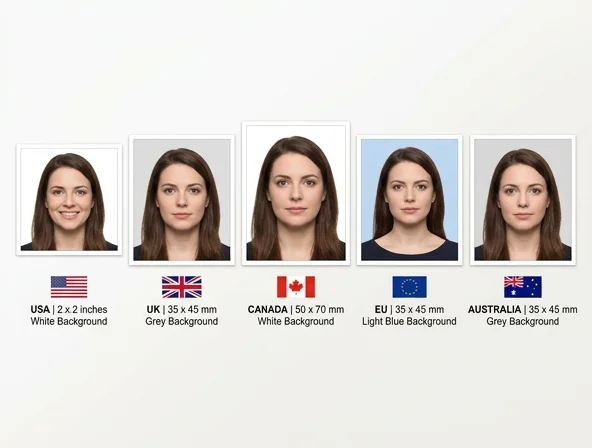
This guide covers the exact requirements for the five most common passports — United States, United Kingdom, Canada, European Union, and Australia. I've compiled the specs directly from each government's official sources, because the requirements changed in several countries during 2025, and most guides online are still citing outdated specs.
If you need a properly formatted photo fast, our AI headshot generator can produce passport-compliant photos from selfies, and the image upscaler ensures your resolution meets the minimum requirements.
Universal Rules (Apply Everywhere)
Before diving into country-specific requirements, these rules apply across every passport authority worldwide:
- Recent photo: Taken within the last 6 months. Your appearance must match how you look today.
- Face the camera directly: No tilting, no turning. Both ears visible in most countries.
- Neutral expression: Mouth closed, eyes open. A natural resting expression. No smiling, frowning, or raised eyebrows.
- No filters or editing: This is a big one for 2026. Multiple countries now explicitly prohibit AI-generated photos, beauty filters, skin smoothing, and any digital alteration. The U.S. State Department specifically warns that AI-altered photos will be automatically rejected.
- Sharp and well-lit: No blur, no grain, no visible pixels. Even lighting on the face with no harsh shadows.
- Plain background: Solid white or off-white in most countries. No patterns, no objects, no other people.

Country-by-Country Requirements
United States (US Passport)
| Requirement | Specification |
|---|---|
| Print size | 2 x 2 inches (51 x 51 mm) |
| Digital size | 600 x 600 to 1200 x 1200 pixels |
| Head height | 1 inch to 1 3/8 inches (25-35 mm) from chin to top of head |
| Background | Plain white or off-white |
| Glasses | Not allowed (changed 2016, still catches people off guard) |
| Head coverings | Only for religious reasons (with signed statement) |
| File format (digital) | JPEG |
| File size (digital) | 240 KB to 10 MB |
| Color space | sRGB |
2025 Update: The State Department tightened rules around digital editing in October 2025. Any alteration using AI, beauty filters, or photo editing software now triggers automatic rejection. Even subtle changes like skin smoothing or background replacement are flagged by their automated screening system. Submit your photo as-shot with only basic cropping.
For the latest official requirements, check the U.S. Department of State passport photo page.
United Kingdom (UK Passport)
| Requirement | Specification |
|---|---|
| Print size | 35 x 45 mm |
| Digital size | At least 600 x 750 pixels |
| Head height | 29-34 mm from chin to crown |
| Background | Plain light grey or cream |
| Glasses | Not allowed (changed 2018) |
| Babies/children | Must be alone in photo, no hands/toys visible |
| File format | JPEG |
| File size | 50 KB to 10 MB |
Key difference from US: The UK requires a light grey or cream background — not white. Many photo booths default to pure white, which can cause rejection. The lighting requirements are also stricter about shadow elimination. The UK's official GOV.UK guidance includes a photo checker tool that validates your image before submission.
Canada
| Requirement | Specification |
|---|---|
| Print size | 50 x 70 mm |
| Digital size | At least 420 x 540 pixels |
| Face height | 31-36 mm from chin to crown |
| Background | Plain white |
| Glasses | Not allowed |
| Unique rule | Photos must be taken by a commercial photographer (for print applications) |
| File format | JPEG |
| File size | Up to 4 MB |
Canada's quirk: For mailed paper applications, Canada requires photos taken by a recognized commercial photographer, and the photographer must stamp the back of the photo. For online renewal applications, digital self-taken photos are accepted but must meet strict size and quality requirements. The print dimensions (50 x 70 mm) are larger than most other countries.
European Union (Schengen Area)
| Requirement | Specification |
|---|---|
| Print size | 35 x 45 mm (most EU countries) |
| Digital size | At least 600 x 750 pixels |
| Face height | 32-36 mm from chin to crown |
| Background | Varies: white (Germany), light blue (France, some others), light grey (others) |
| Glasses | Not allowed in most EU countries since 2020 |
| Expression | Neutral, mouth fully closed |
Watch out for: Background color varies by country within the EU. Germany requires pure white. France traditionally accepted light blue but has shifted to white/light grey for new biometric passports. Italy accepts white or light grey. Always check your specific country's embassy or passport office requirements, as these can differ even within the EU framework.
Australia
| Requirement | Specification |
|---|---|
| Print size | 35 x 45 mm |
| Digital size | At least 600 x 750 pixels |
| Face height | 32-36 mm from chin to crown |
| Background | Plain white |
| Glasses | Not allowed |
| Unique rule | Both ears must be fully visible |
| File format | JPEG |
| File size | 80 KB to 5 MB |
Australia's strict points: Both ears must be clearly visible — no hair covering them. The face must occupy 60-80% of the frame height, which is a tighter range than most countries. Shadows are particularly scrutinized; even subtle shadows under the chin or behind the head cause rejection.
How to Take a Passport Photo at Home
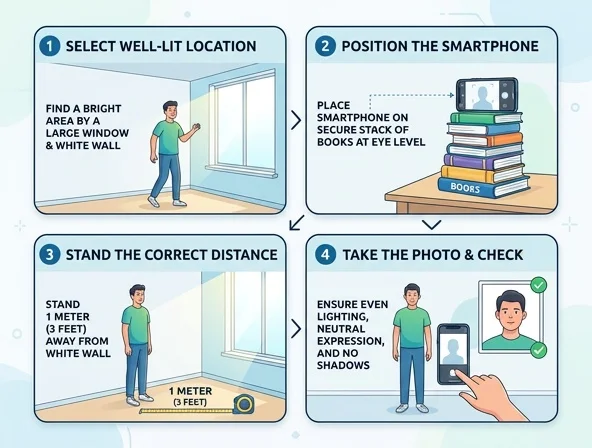
You don't need a photo studio. A smartphone, a blank wall, and decent lighting are all it takes. Here's the process I use:
Equipment
- Camera: Any smartphone made in the last 5 years. Use the rear camera, not the selfie camera — rear cameras have better resolution and less lens distortion.
- Tripod or prop: Lean the phone against a stack of books at head height. Shaky handheld shots cause blur that can trigger rejection.
- Background: A plain white wall works for US, Canada, and Australia. For UK photos, hang a light grey sheet or posterboard.
- Lighting: Face a large window during daylight hours (9 AM to 2 PM is ideal). The window light should hit your face evenly. No overhead lights that create shadows under your eyes or nose.
Step by Step
- Stand 1 meter (3 feet) from the background to avoid casting shadows on the wall.
- Position the camera at eye level, about 1.5 meters (5 feet) away from your face. Too close causes lens distortion that widens your nose and narrows your ears.
- Face the camera straight on. Imagine a line from the camera lens to the bridge of your nose — it should be perfectly horizontal.
- Use the timer (3-second or 10-second delay) so you're not reaching for the phone when the photo is taken.
- Take 10+ photos. Review them all at full zoom. Check for: both eyes open, no blur, even lighting, no shadows, neutral expression. Pick the best one.
- Crop to the correct aspect ratio for your country (see tables above). Don't resize — crop from the original full-resolution image.
Common Mistakes That Cause Rejection
- Selfies: The selfie camera introduces barrel distortion and is usually lower resolution. Always use the rear camera with a timer or remote.
- Overhead lighting: Creates shadows under the nose, chin, and brow ridge. These shadows alone are the #1 rejection reason.
- Flash: Creates hotspots on the forehead and nose, plus red-eye risk. Natural window light produces far better results.
- White clothing on white background: Your outline disappears. Wear dark or colored clothing that contrasts with the background.
- Compression: Don't send the photo through WhatsApp, iMessage, or social media before submitting — they compress the image below the required quality threshold.
Quick Reference: Dress Code by Country
| Country | Acceptable | Not Acceptable |
|---|---|---|
| US | Normal everyday clothing | Uniforms, camouflage, costume, sunglasses, hats |
| UK | Normal clothing, plain tops preferred | Uniforms, sunglasses, hats (except religious) |
| Canada | Everyday clothing | Uniforms, hats, headphones, sunglasses |
| EU | Normal clothing, dark/solid colors recommended | Uniforms, headwear (except religious), sunglasses |
| Australia | Normal clothing | Uniforms, hats, tinted glasses, headphones |
Can I Use AI to Take My Passport Photo?
This is the question I get most in 2026, and the answer is nuanced. Multiple countries now explicitly ban AI-generated or AI-altered passport photos. The US State Department rejects any photo that has been "changed using computer software, phone apps, filters, or artificial intelligence. You can also check out our AI professional headshots."
However, using AI tools for cropping, resizing, and background adjustment falls into a grey area. Our background remover can replace a non-compliant background with the correct white/grey, and the image upscaler can ensure your resolution meets requirements — these are technical adjustments, not face alterations. Use your judgment and check your country's latest guidance.
What is never acceptable: using AI to smooth skin, change facial features, adjust eye color, add makeup, or generate a face that isn't a real photograph of you. That's fraud, and increasingly it's being caught by automated biometric screening systems. You can also check out our AI dating profile photos.
Watch: How to Take the Perfect Passport Photo at Home
Frequently Asked Questions
Can I smile in my passport photo?
No. All five countries covered in this guide require a neutral expression with your mouth closed. The US allows a "natural" expression, which some interpret as a slight smile, but the safest approach is a completely neutral face. The biometric scanning systems used at airports work best with neutral expressions, which is why every country has moved to this standard. Even if a slight smile passes the application screening, it could cause delays at automated passport gates.
How much does a passport photo cost at a store?
At major retailers: Walgreens charges about $16.99 for two prints in the US. CVS is similar at $16.99. Costco offers passport photos for around $6.99 (membership required). Walmart charges about $7.44. UK photo booths run about 6-8 GBP. For the DIY route at home, the cost is effectively $0 plus whatever you spend printing at a local shop (usually under $1 for two 4x6 prints that you can cut to size). Many countries now accept digital submissions directly, eliminating printing costs entirely.
Do babies and toddlers follow the same photo rules?
Babies and toddlers must have their own passport photo, but the rules are relaxed. The US and UK allow infants' eyes to be closed. No other person, toy, or pacifier should be visible. The background must still be plain white/grey. A practical trick: lay the baby on a white sheet on the floor and photograph from directly above. Their head doesn't need to fill the same percentage of the frame as an adult. Supporting hands are allowed for very young infants in most countries but must be out of the frame — gloves matching the background color can help.
How long is a passport photo valid?
Six months from the date it was taken. If your appearance has changed significantly (major weight change, new or removed facial hair, different hair color, aging), you should take a new photo even within the six-month window. The purpose of the photo is identification, and border agents compare your face to the photo in real time. If you no longer look like your passport photo, you'll face additional screening or potential denial of entry at international borders.

