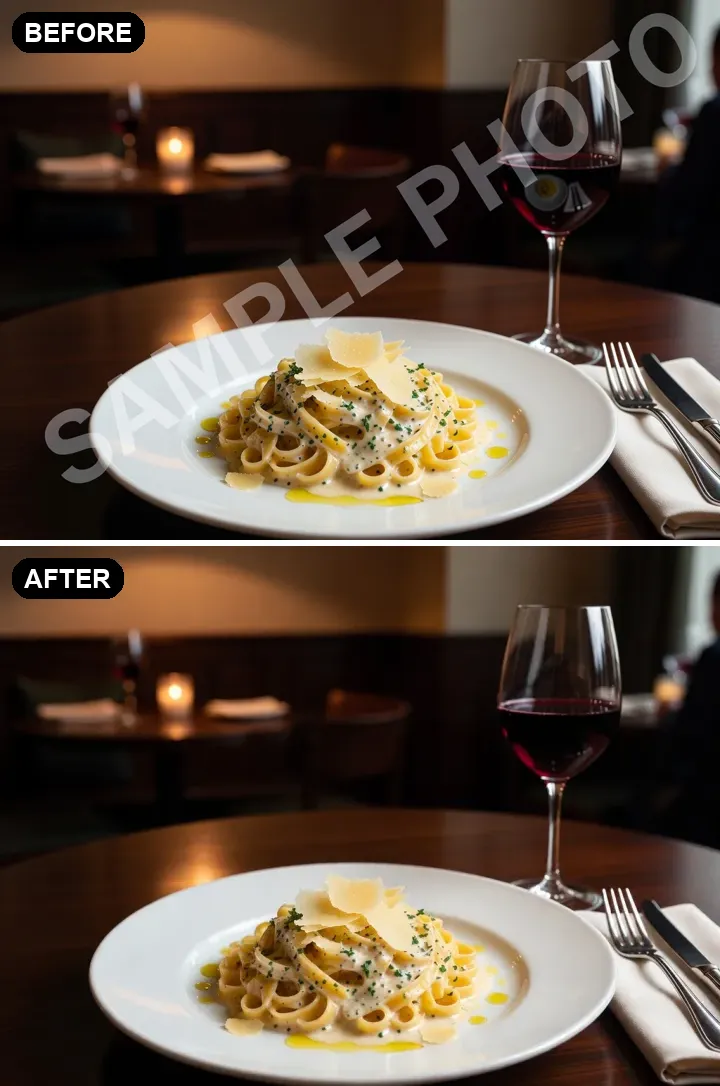
You found the perfect photo from your trip, but someone put a caption across it. Or an old print has an orange date stamp in the corner, or a group shot is covered in emojis and stickers from a chat app. You want the clean photo back, and cloning it out by hand takes forever.
The short answer: upload your own photo to our remove text from photo tool and tick what to remove: captions and overlaid text, stickers and emojis, or a date stamp. You get the clean photo in about a minute.
Here is how it compares with Cleanup.pictures, Picsart, Adobe Express and Fotor.
Quick answer: the best way to remove text from a photo
- PhotoAI Studio (our tool): the pick for removing text, stickers or a date stamp in one click, with no brushing, paid per photo.
- Cleanup.pictures: the pick if you want to brush over things yourself and a 720p result is enough.
- Adobe Express: the pick if you want free daily object removal inside a design tool.
Text removal tools compared
| Tool | Price | What you get | Best for | Watch out for |
|---|---|---|---|---|
| PhotoAI Studio (our tool) | 60 credits a photo, one-time packs, under $1 a photo on the smallest pack | Removes captions, stickers and emojis, or a date stamp, no brushing | Clean photos in one click | Only for photos you own; needs a free account |
| Cleanup.pictures | Free with 720px export; Pro $5/month or $36/year | Brush over text or objects to erase them | Quick manual fixes | Free exports are 720px |
| Picsart | Free to start; Pro and Ultra subscriptions, see their site | Text and object remover plus a full editor | People who edit a lot on phone | Best features sit in paid plans |
| Adobe Express | Free plan with free daily generations; Premium, see their site | Insert and remove objects with Adobe AI | Adobe users | Daily limit on free generations |
| Fotor | Free text remover; paid plans, see their site | Online text remover and photo editor | A quick free try | Free plan has limited credits |
PhotoAI Studio (our tool): pick what to remove, get the clean photo
You upload one of your own photos and tick what should go: captions and overlaid text, stickers and emojis, or a date stamp. There is no brush to paint and no mask to draw. The clean photo is ready in about a minute, saved to your private gallery and downloadable full size.
Each photo costs 60 credits. Credits come in one-time packs with no subscription, they never expire, and the smallest pack works out to under $1 a photo. If a photo fails, its credits come back automatically. You need a free account to create.
- Strengths: one click, faces stay as they were, and full-size downloads.
- Weaknesses: it removes text, stickers and date stamps, not every kind of object, and it is only for photos you own.
- Suits: anyone cleaning up family photos, trip photos or old scans with date stamps.
A note on fairness: please do not use it to strip watermarks or credits from other people's photos. Use it on photos you took or own.
Cleanup.pictures: brush it away yourself
Cleanup.pictures lets you paint over text, objects or defects to erase them. The free plan gives unlimited images but exports at 720px. Pro, at $5 a month or $36 a year, removes the resolution limit and adds a high-quality refiner.
It is fast and cheap for quick fixes. You do the brushing, and for full-size results you need Pro.
Picsart: a full phone editor with a text remover
Picsart has a text remover that is free to start, along with many other editing tools. Its Pro and Ultra plans are subscriptions, shown in euros on its pricing page, so see their site for your price.
It is good if you edit photos often and want everything in one app. For one cleanup, a subscription may be more than you need.
Adobe Express: free daily object removal
Adobe Express's free plan includes free daily generations for inserting and removing objects, along with templates. Premium adds 250 generative credits a month.
It is a good free option if you only have a few photos. Daily limits apply, and you mark what to remove yourself.
Fotor: a free online text remover
Fotor offers a free web-based text remover and a full photo editor, with apps for iPhone and Android. The free plan has limited credits, and paid plans add more, see their site.
It is easy to try for free. Check the export quality and credit limits before you rely on it for many photos.
How to remove text from a photo with PhotoAI Studio
- Add your photo. Open the remove text from photo tool and upload one of your own photos.
- Pick what to remove. Tick captions and overlaid text, stickers and emojis, or a date stamp.
- Get your clean photo. It is ready in about a minute. Download it full size from your gallery.
Tips for a cleaner result:
- Upload the largest, original version of the photo you have, not a screenshot of it.
- For old prints with a date stamp, scan them flat in good light so the area behind the stamp is easy to rebuild.
FAQ about removing text from photos
How do I remove text from a picture without ruining it?
Use an AI tool that rebuilds what was behind the text. Ours removes captions, stickers or a date stamp and fills the area to match the photo.
Can I remove a date stamp from an old photo?
Yes. Pick the date stamp option, and the tool removes the printed date and fills in the background.
Is there a free way to remove text from a photo?
Cleanup.pictures, Adobe Express and Fotor have free options with limits. Ours costs 60 credits a photo, under $1 each on the smallest pack.
Can I remove a watermark with it?
Only from photos you own. Removing watermarks from other people's work can break copyright rules, so we ask you to use the tool on your own photos.
Get your clean photo back in a minute. Try our remove text from photo tool.