

When you're trying to find the best AI image upscaler, you're really looking for a tool that delivers on three fronts: precision, speed, and a workflow that doesn't make you want to pull your hair out. For most people I've worked with, PhotoAI Studio hits that sweet spot, balancing seriously impressive high-resolution upscaling with a full suite of editing tools. It's become a go-to for pros and serious creators for a reason.
Why High-Quality Images Are Non-Negotiable
Let's be blunt: in the online world, your visuals are your handshake. They're the first impression.
Whether you're selling products, building a personal brand on LinkedIn, or running a marketing campaign, the quality of your images sends a powerful message about your professionalism. A pixelated, blurry photo doesn't just look bad; it actively erodes trust. It makes people wonder if you cut corners elsewhere, too.
This is exactly where AI image upscalers come in. They aren't your old-school resizing tools that just stretch out pixels and hope for the best, leaving you with a fuzzy mess. Modern AI uses complex neural networks to intelligently add new detail. It looks at your image, recognizes things like textures, edges, and patterns, and then reconstructs a larger version that actually looks sharp and natural.
This tech solves a really common headache. I can't tell you how many people wonder why you might look bad in pictures, and half the time, it's not them—it's just a low-quality photo. An AI upscaler can fix that by sharpening facial features, adding clarity to the background, and bringing back details that were lost.
The market for these tools has absolutely exploded. We're seeing the AI Image Upscaler space growing from what was a USD 500 million market to a projected USD 1.5 billion by 2033. That’s not just hype; it reflects a genuine, critical need for better visuals everywhere.
The Power of AI Enhancement
Tools like PhotoAI Studio really show how far this technology has come and how easy it is to use.
You can just upload a photo and immediately see a high-res version. This kind of simplicity means anyone can get professional-level results without needing to be a Photoshop wizard.
The real magic of a top-tier AI upscaler isn't just about making an image bigger. It's about making it better. By intelligently recreating detail, these tools turn a mediocre photo into a visual asset that actually works for you.
To really figure out the best AI image upscaler for your work, we need to dig into what matters. Throughout this guide, I'm going to compare the top contenders based on the stuff that actually impacts your final product:
- Upscaling Precision: How well does the AI add detail without making things look weird or artificial?
- Performance Speed: How long does it take? This is huge if you're processing more than one image at a time.
- Feature Depth: What else can it do? Think batch processing, color correction, or photo restoration.
- Overall Value: When you look at the price, the features, and the quality of the results, does it feel worth it?
This is the framework we'll use to cut through the marketing noise and help you pick a tool that will deliver real results for whatever you're trying to accomplish.
How to Judge an AI Image Upscaler: The Core Criteria
Picking the right AI image upscaler isn’t about finding one “best” tool for everyone. It’s about finding the right tool for you. To get past the marketing fluff, you need a solid framework for judging what actually matters. I’ve found it always comes down to four key pillars that separate a truly great upscaler from the rest.
The single most important factor is how well the AI adds detail without creating weird, distracting flaws. A cheap tool might make an image look sharper at a glance, but look closer and you’ll see plastic-looking skin or digital noise smeared across clean backgrounds. This is what I call upscaling fidelity.
You have to look for the subtle giveaways, like edge halos (those faint glows around objects) or textures that look smeared instead of sharp. The goal is to enhance the photo, not make it scream "I was processed by an AI." The real magic is in balancing new sharpness with the original character of the image.
Upscaling Fidelity and Artifact Control
At its heart, an upscaler has to invent details that weren't there to begin with. This is a tightrope walk. Go too far, and you get an over-processed, synthetic mess. Don't go far enough, and the picture stays soft and blurry.
When you're testing a tool, throw some tough subjects at it:
- Portraits: Does the AI keep natural skin texture, like pores or freckles? Or does it smooth them into oblivion like a bad beauty filter?
- Landscapes: Are the fine details, like individual blades of grass or distant trees, actually sharpened? Or do they just turn into a green smudge?
- Text and Graphics: This is where many tools fall flat. Can it keep text and logos with clean, sharp lines, or does it introduce weird distortions?
The mark of a truly superior AI upscaler is its ability to add detail that feels completely organic. It should make you wonder if the photo was ever low-resolution at all, not make it painfully obvious an algorithm has been at work.
Processing Speed and Workflow Impact
Speed isn't just a nice-to-have; it's a critical part of your workflow. If you’re a pro editing hundreds of product shots or a marketer on a tight deadline, waiting around for images to process is a real bottleneck. This is where you have to decide between cloud-based platforms and local software.
Cloud-based tools like PhotoAI Studio have a huge advantage because they use powerful servers in the cloud, so your own computer’s specs don’t matter. This makes them fast and accessible to everyone. On the other hand, local software can be faster for a single image if you have a beast of a machine, but it can easily bog down your whole system when you try to run a big batch.
Beyond Upscaling: The Features That Matter
The best AI image upscaler rarely just upscales. The top platforms today build upscaling into a bigger creative toolkit, which can massively speed up your entire process by keeping everything in one spot.
A few key features to look out for:
- Batch Processing: For anyone working with more than a few photos at a time, the ability to upload and upscale a whole folder at once is an absolute must-have.
- Integrated Editing Tools: Things like color correction, background removal, or even AI-powered photo restoration can save you from having to jump between different apps.
- API Access: For businesses and developers, an API is crucial. It lets you plug the upscaling technology directly into your own website, app, or internal workflow.
Pricing Structures and What You Actually Get
Finally, you have to look at the cost. Pricing models are all over the place, from monthly subscriptions and credit packs to one-time software purchases. Don't just stare at the price tag; think about the true value for how you work.
A monthly subscription might be a great deal for a marketing agency with a constant stream of images. But for a freelancer with occasional projects, a pay-as-you-go credit pack offers much better value. The goal is to find a model that fits your rhythm, so you’re only paying for what you actually use. You can learn more about AI tools in our article series that digs into a wide range of creative applications.
A Head-to-Head Comparison of Leading AI Upscalers
Now that we know what to look for, it's time to put the leading AI upscalers to the test. A simple feature list won't cut it. The true measure of an upscaler is how it performs in the real world, with all the messy, imperfect details that marketing materials conveniently ignore. We're going beyond the hype to see how these tools really stack up side-by-side.
This comparison gets specific. We'll focus on how each tool handles common but tricky subjects: human portraits, intricate landscapes, and sharp product photos. The goal isn't just to pick a "winner," but to give you clear, situational advice on which tool is the right fit for your projects.
The Contenders: A Quick Overview
To get a fair read on the market, I've picked some of the most prominent names in AI upscaling, each with a different philosophy. Some are dedicated workhorses, others are part of a bigger creative ecosystem.
Here’s the lineup:
- PhotoAI Studio: This is positioned as an all-in-one platform for visual content. Its Photo Upscaler is just one piece of a larger Edit & Enhance toolkit, built for a smooth, integrated workflow.
- Topaz Gigapixel AI: A long-time favorite among photographers. It’s known for its powerful, detail-obsessed models, often used as a dedicated desktop app for serious pixel-peeping.
- Krea AI Enhancer: A more approachable, browser-based tool that's popular with digital artists and creators who value ease of use and creative speed.
- Recraft AI: Another web-based tool that's been gaining fans for its knack for preserving natural textures and handling tough details like text.
Each one of these brings something unique to the table. My analysis will break down exactly where those differences matter. This decision tree is a great way to frame your thinking as we dive in.
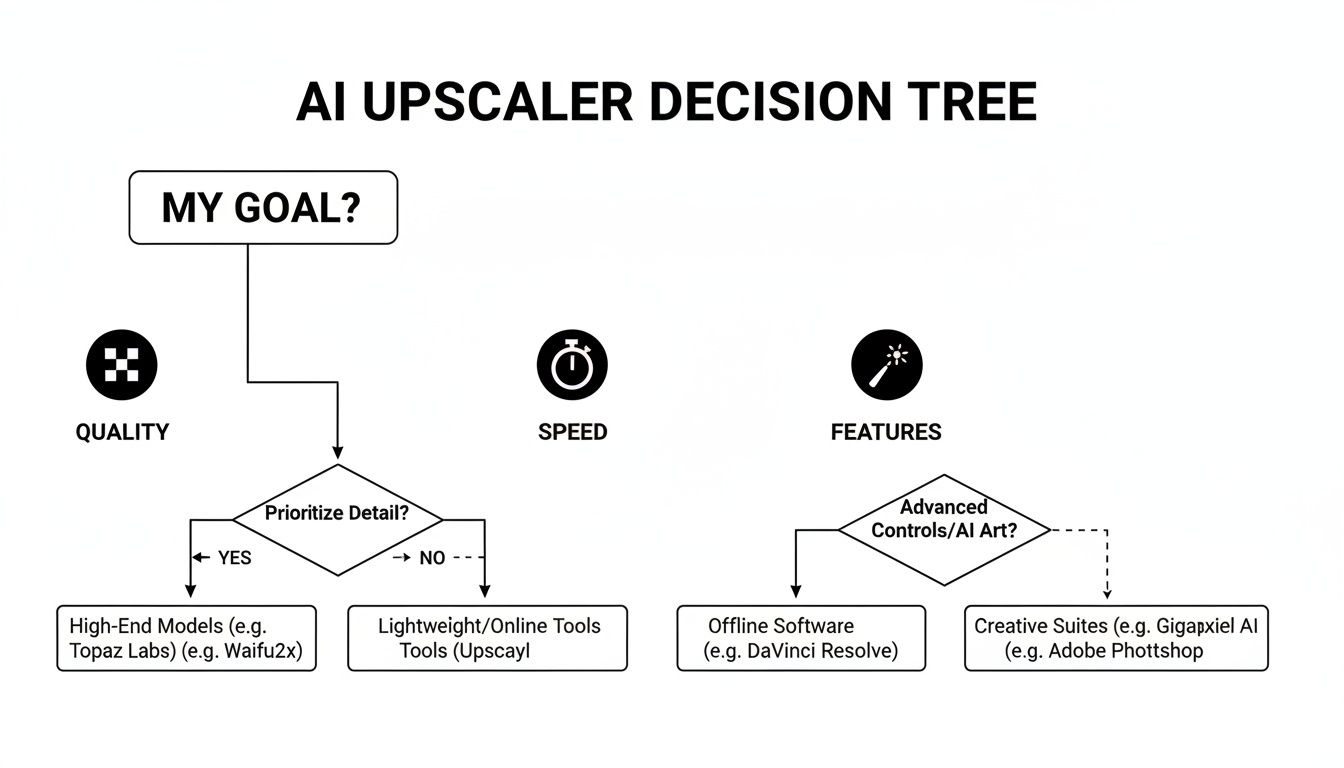
As you can see, the path to the right tool starts with defining what matters most to you: pristine quality, raw speed, or a deep feature set.
Portrait Upscaling: The Test of Realism
Portraits are the ultimate trial for any AI upscaler. The human eye is an expert at spotting fakes, and even a tiny flaw in skin texture or hair can make a professional photo look cheap and over-processed. You can also check out our AI professional headshots.
PhotoAI Studio consistently nails this with balanced, natural results. It’s fantastic at sharpening details like hair and eyes while keeping skin looking like, well, skin—freckles, pores, and all. The AI seems to have been carefully trained to sidestep that dreaded "plastic skin" effect, making it a go-to for professional headshots where authenticity is everything.
Topaz Gigapixel AI, on the other hand, can be a bit of a powerhouse that needs taming. It pulls out incredible detail, but sometimes its default settings smooth skin a little too aggressively, creating a slightly synthetic look. You can dial it back, but it takes more fiddling to get the balance just right.
Krea AI and Recraft AI both do a respectable job. Recraft, in particular, shows a real strength in preserving the original character of a face, keeping details intact without adding weird artifacts. Krea is simple and fast but doesn't offer the fine-tuned control you’d want for high-end professional work.
The real magic in portrait upscaling is the AI's ability to "hallucinate" details that feel authentic. Tools like PhotoAI Studio shine by enhancing realism, not just sharpness—a critical difference for anyone working with human subjects.
Landscape Enhancement: The Detail Challenge
When you're upscaling a landscape, the game is all about enhancing those fine, distant details—leaves on a tree, the texture of a rock face—without making the image look noisy or artificial. It's a delicate balance.
PhotoAI Studio handles these complex scenes with a really impressive touch. It sharpens distant trees and textures without creating those ugly, glowing halos around the edges. The results just feel clean and natural, adding depth to the photo without screaming "digitally enhanced."
Topaz once again flexes its muscles here, extracting a massive amount of detail. For certain shots, like crisp architectural photos or rocky terrains, this is a huge win. But for softer scenes, like a misty forest, its aggressive sharpening can feel a bit heavy-handed.
It’s no surprise that the tech behind these tools is so competitive. North America dominates the AI image enhancement market, holding a massive 35.3% share. This is driven by tech hubs where companies first developed the models now powering tools like PhotoAI Studio's Edit & Enhance suite. You can discover more insights about the AI Image Enhancer market on openpr.com.
Product Photography: The Text and Edge Test
For anyone in e-commerce, clarity is king. Product shots often have logos, text, and sharp edges that need to stay perfectly crisp when enlarged. This is where a lot of AI models fall flat, turning fine print into a blurry mess.
Recraft AI really stands out here. Its model seems specially trained to handle these high-frequency details, preserving the clean lines of typography better than almost any other tool. If you're upscaling images of product labels or packaging, this is a game-changer.
PhotoAI Studio also performs very well, delivering clean edges and readable text, which makes it a reliable workhorse for online store owners. The fact that it's integrated with a background remover is a huge workflow bonus for creating product listings.
Topaz and Krea can be less consistent on this front. They're capable, but they sometimes introduce slight distortions around fine text that might require a bit of cleanup for professional use.
The Verdict: Situational Recommendations
After running these tools through their paces, it's obvious there's no single "best" AI image upscaler. The right choice depends entirely on what you're doing.
AI Image Upscaler Feature Showdown
This table breaks down the core strengths and ideal uses for each tool we tested, helping you match the right features to your specific needs. You can also check out our AI dating profile photos.
| Tool | Maximum Upscale | Key Differentiator | Ideal For | Pricing Model |
|---|---|---|---|---|
| PhotoAI Studio | Up to 4x | Integrated suite with editing tools | All-in-one workflows for marketers and creators | Credit-based |
| Topaz Gigapixel AI | Up to 6x | Granular control and detail recovery | Professional photographers with high-end hardware | One-time purchase |
| Krea AI Enhancer | Varies | Simple interface and creative adjustments | Digital artists and casual users | Freemium/Subscription |
| Recraft AI | Up to 4x | Superior text and graphic preservation | E-commerce and graphic design projects | Freemium/Subscription |
The table gives you the high-level view, but the real story is in the workflow. PhotoAI Studio’s power isn't just in its upscaling quality—which is top-notch—but in its context.
By bundling the upscaler with a full set of tools like a background remover, photo editor, and even a professional headshot generator, it eliminates the pain of bouncing between different apps and subscriptions. For a small business owner or social media manager, that unified workflow is a massive time-saver. It just makes sense.
If you're a professional photographer who only needs the most powerful, standalone upscaling for massive prints, Topaz is still a beast. For quick, creative boosts, Krea is fantastic. And for e-commerce pros laser-focused on product shots with text, Recraft is a stellar choice.
However, for the vast majority of people who need a mix of quality, versatility, and efficiency, PhotoAI Studio offers the most compelling and complete package. It perfectly bridges the gap between a specialized, single-purpose tool and a comprehensive creative platform.
How AI Upscalers Drive Real-World Results
Specs and feature lists are one thing, but the real test of an AI image upscaler is how it solves actual problems. Let's move past the technical jargon and look at how these tools deliver tangible results for professionals, turning frustrating visual roadblocks into genuine growth. These aren't just theories; they're everyday wins.
The right tool can dramatically shorten the path from a low-quality source image to a polished, conversion-ready asset. For many, this is the difference between a stalled project and a successful launch.

For E-Commerce Entrepreneurs
Picture this: you run an e-commerce store, and your supplier sends over product photos. The problem? They're small, a little blurry, and totally wrong for your high-resolution website theme. A few years ago, you'd have to either reshoot everything—a huge drain on time and money—or use the bad images and watch your sales suffer.
This is exactly where an AI upscaler becomes a game-changer.
An entrepreneur can feed those low-res supplier images into the tool and instantly scale them to 2x or 4x their original size. The AI doesn't just stretch the pixels; it intelligently sharpens textures, clarifies tiny product details, and makes the colors pop. What you get is a crisp, professional product catalog that builds trust and drives sales, all without the cost of a photo shoot.
For Digital Marketers
Digital marketers are constantly juggling assets—from slick campaign photos to grainy, user-generated content (UGC). A customer might post a fantastic photo with your product on Instagram, but it’s too pixelated to use in a high-impact ad or on your website.
AI upscaling bridges that quality gap. A marketer can take that authentic UGC and enhance it to meet brand standards while keeping its genuine feel. This works for old photos, too. That low-res image from a brand event a decade ago? It can be upscaled and restored, ready for a "throwback" social campaign that looks sharp on modern screens.
An AI upscaler transforms visual liabilities into assets. It gives professionals the power to reclaim and repurpose their entire visual history, ensuring every image can be deployed at its highest potential quality.
This idea even applies to specialized industries like real estate. For instance, the best virtual home staging software uses AI to transform empty rooms into compelling listings. In the same way, an upscaler can sharpen exterior property photos, making them far more attractive to potential buyers scrolling online.
For Content Creators and Professionals
If you’re a content creator on YouTube or Twitch, you're always working with screenshots, game captures, and old video clips. To keep things looking professional, every asset needs to be high-def. An AI upscaler is the perfect solution for turning a standard 1080p screenshot into a crystal-clear image ready for a 4K video edit.
This need for a polished image extends to personal branding. Let's say a professional wants to update their LinkedIn profile but only has a casual photo from their phone. The pose is great, but the quality isn't. An AI upscaler can enhance facial details, sharpen the background, and create a high-resolution headshot worthy of any corporate profile.
Platforms like PhotoAI Studio take this a step further. After upscaling your photo, you can use other integrated tools to perfect it. You can see just how powerful this is by trying a free professional headshot generator and comparing the results.
In every one of these cases, the best AI image upscaler isn't just a utility; it's a problem-solver. It saves time, cuts costs, and elevates the final product. The key is finding a tool that fits right into your workflow, which is why an all-in-one platform often provides the biggest practical advantage.
Why PhotoAI Studio Is Our Top Recommendation
After putting all these tools through their paces, one platform didn't just upscale images well—it made the entire creative process feel effortless. That platform is PhotoAI Studio.
While dedicated, single-function upscalers have their place, they often create more work. You upscale a photo, then have to jump into another app to remove the background, then another to drop it into a design. PhotoAI Studio wins our recommendation because it's a complete visual content hub, not just another single-task tool.
This integrated approach is the real game-changer. Instead of just getting a bigger version of your photo, you get a whole suite of tools that talk to each other. You can take an old, low-res image, upscale it, instantly remove the background, and then use it in a new design—all without ever leaving the platform. Think of the time—and subscription fees—that saves.
For anyone creating content, that efficiency is gold. Having a Photo Upscaler, Professional Headshot generator, Background Remover, and Photo Restoration tool all under one roof isn't just a nice-to-have; it's a serious workflow advantage.
An All-In-One Creative Powerhouse
Most apps make you pick: do you want a specialized tool that does one thing perfectly, or a versatile one that's a jack-of-all-trades but master of none? PhotoAI Studio manages to be both. It offers a set of high-quality, specialized functions inside a single, easy-to-navigate environment.
This design isn't accidental; it directly solves a real-world problem. You rarely perform just one edit on a photo. The platform is built to flow from one task to the next. The screenshot below shows just how simple the upscaler is to use—just drag, drop, and you're done.
That simplicity means anyone can get professional results without needing a technical manual. It makes powerful AI genuinely accessible.
And it’s all browser-based, which is where the industry is heading. Cloud-based AI image tools are becoming the new standard, accounting for an estimated 75% of deployments. This shift means an e-commerce store owner needing crisp product photos or a professional creating a new LinkedIn headshot can get top-tier results without installing bulky software.
Smart Pricing for Modern Workflows
The other standout feature is the credit-based pricing. Let's be honest, rigid monthly subscriptions are frustrating. You pay the same fee whether you're working on a huge project or having a slow month. PhotoAI Studio’s system is different—it flexes with your actual usage.
This is a perfect fit for freelancers, agencies, or small businesses whose needs change constantly.
The real value of PhotoAI Studio isn't just its best-in-class upscaling. It’s how it consolidates your entire visual workflow, getting you from a raw image to a finished asset faster than any other platform.
You only pay for what you use, giving you much tighter control over your budget. It’s a practical, cost-effective model that respects the unpredictable nature of creative work. You can take a look at the different plans and see how PhotoAI Studio’s pricing structure works to figure out what makes sense for you.
At the end of the day, PhotoAI Studio earns our top spot because it gets the bigger picture. It doesn't just deliver a fantastic upscaler; it solves the much larger, more annoying problem of a disconnected and inefficient creative process.
Common Questions About AI Image Upscaling
As you start exploring AI upscalers, a few questions pop up time and time again. Getting clear, honest answers is the key to setting the right expectations and really making these tools work for you. Let's tackle the big ones.
We'll get into how the magic actually works, share some practical tips from the trenches for getting jaw-dropping results, and touch on the important topic of security.
Can AI Truly Create Details That Were Not There?
This is the most fascinating question, and the answer is what makes these tools feel like magic. An AI upscaler isn't just stretching your image; it's performing an intelligent reconstruction. It has been trained on millions of high-resolution images, learning what everything should look like.
When it looks at a low-resolution portrait, it sees patterns that it recognizes as skin texture, eyelashes, or individual strands of hair. Drawing on its massive library of visual data, it then "hallucinates" or generates new pixel details that are statistically probable. It isn't pulling these details out of thin air; it's making incredibly educated guesses to fill in the missing information.
Think of it like a skilled art restorer who knows an artist's brushwork inside and out. They aren't inventing a new painting; they're using deep expertise to restore what’s missing in a way that’s authentic to the original. That’s exactly what a good AI upscaler does for your photos.
What Is the Difference Between Upscaling and Resizing?
While both make an image bigger, the "how" is completely different, and the results are worlds apart. Nailing this distinction is crucial to understanding why you’d want an AI-powered tool in the first place.
Traditional Resizing: This is just basic math. An algorithm like "Bicubic" simply copies existing pixels or averages the colors of neighboring pixels to invent new ones. The result is always a blurry, pixelated mess because no new information is ever created. It's just a bigger, fuzzier version of the original.
AI Upscaling: This is a generative process. Instead of just dumbly copying pixels, the AI analyzes the content of your image—the faces, the textures, the lines—and intelligently builds new, context-aware details. It sharpens edges, reconstructs textures, and adds real clarity, giving you a high-resolution image that looks genuinely sharp, not just stretched.
The difference isn't subtle. It's night and day.
How Can I Achieve the Best Possible Upscaling Results?
Getting a killer result isn’t just about the tool you use; it’s about the quality of what you feed it. Your source image is the single biggest factor. AI is powerful, but it's not a miracle worker—it needs something decent to work with.
Here are a few tips that actually work:
- Start with the Best Source Possible: Always use the highest-resolution version you have. A crisp 600x400 pixel photo will upscale infinitely better than a muddy, over-compressed 300x200 version of the same shot.
- Avoid Over-Compressed JPEGs: Heavy JPEG compression creates ugly, blocky artifacts that can seriously confuse the AI. If you have the option, start with a PNG or a high-quality JPEG to give the AI clean data to analyze.
- Choose the Right Settings: Play around with the upscale factor (2x vs. 4x). Pushing the AI to its absolute limit isn't always the best move. Sometimes a cleaner 2x upscale produces a more natural-looking result than a 4x that might introduce tiny imperfections.
Are Online AI Image Upscalers Secure?
This is a totally valid concern. Uploading personal or client photos to any online service should make you pause and think about security. Reputable providers get this and have clear, transparent policies to protect your stuff.
Most top-tier services use secure, encrypted connections for all uploads and downloads, so your files are protected while they travel across the internet. They also typically have privacy policies stating they won't use your images for anything other than the service you asked for. Many also automatically purge your files from their servers after a short window of time.
Bottom line: always glance at the privacy policy and terms of service before you upload. Stick with a provider that is upfront about how they handle your data, and you can work with peace of mind.
Ready to see the difference for yourself? PhotoAI Studio has a powerful, easy-to-use Photo Upscaler built right into its full suite of creative tools. It's time to stop accepting blurry images and start creating visuals that demand attention.


